How Can Small Businesses Use AI to Create a “Second Brain” for Their Business?
If your business depends on everything you remember, growth gets harder. Here’s how AI can help small businesses build a searchable “second brain.”

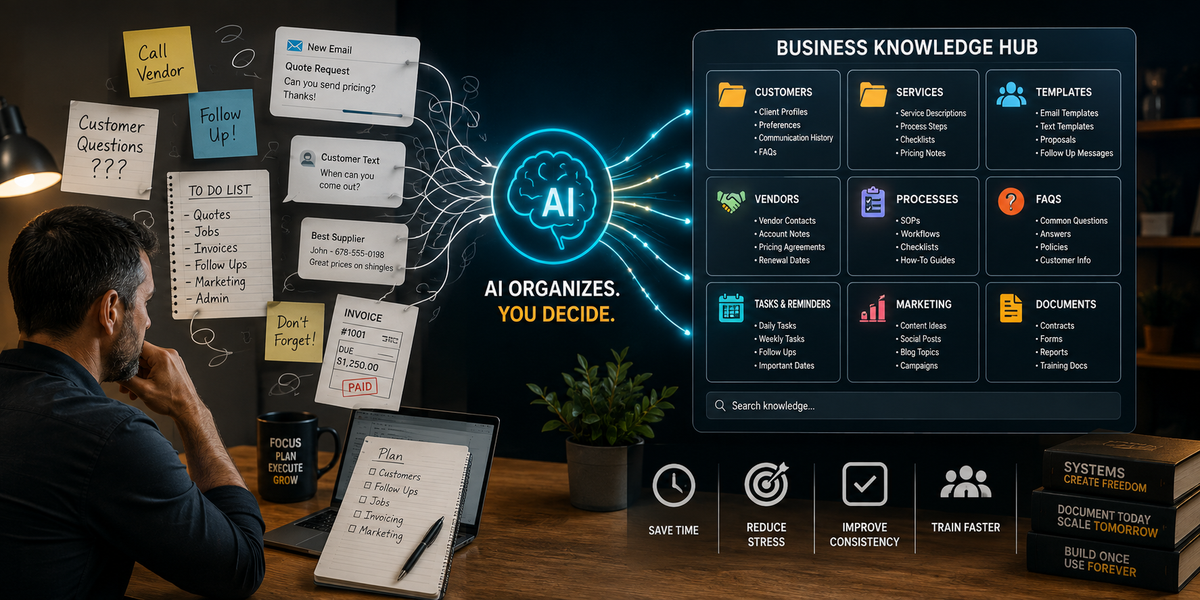
Most small businesses do not have an information problem.
They have a memory problem.
The owner knows where everything is.
The owner knows which customer likes what.
The owner knows which vendor to call.
The owner knows the “right way” to handle a weird situation.
The owner knows what to say when a customer asks the same question again.
The owner knows the service steps, the exceptions, the shortcuts, and the little things that keep the business running.
That sounds normal.
But it is also dangerous.
Because if all of that knowledge lives in one person’s head, the business becomes harder to run, harder to train, and harder to grow.
Here is the tabloid truth:
Your business knowledge is trapped in your head… AI can help.
Not by replacing your experience.
AI can help you turn your experience into a searchable, organized system your business can actually use.
That is what people mean when they talk about a “second brain.”
For a small business, a second brain is not some fancy tech project. It is a practical place to organize the information you keep repeating, remembering, rewriting, and re-explaining.
What is a business “second brain”?
A business second brain is a central place where important business knowledge is stored, organized, and easy to find.
It can include:
- checklists
- customer instructions
- service steps
- vendor notes
- pricing notes
- FAQs
- message templates
- policies
- task lists
- meeting notes
- content ideas
- training guides
- follow-up reminders
- troubleshooting steps
- recurring processes
It does not have to be complicated.
It could start in Google Drive, Microsoft OneNote, Notion, a shared folder, a spreadsheet, a project management tool, or another system your business already uses.
AI helps by turning messy information into organized, usable information.
Why small businesses need this
Small business owners often become the default storage system.
That creates problems.
You repeat yourself constantly
If customers, employees, vendors, or contractors keep asking the same questions, you need a reusable answer.
Training becomes harder than it should be
If every process has to be explained from scratch, new help takes longer to become useful.
Mistakes happen more often
When people rely on memory, steps get skipped.
The owner becomes the bottleneck
If everyone needs the owner to answer every question, the business cannot move quickly.
Growth becomes stressful
A business cannot scale well when the system is “ask the owner.”
AI can help move knowledge out of one person’s head and into a repeatable structure.
What belongs in your AI-assisted business brain?
Start with information you already use every week.
Do not try to organize your entire business in one day.
Start with the pieces that save time, prevent mistakes, or improve customer experience.
1. Common customer questions
Examples:
- How much does this cost?
- How long does it take?
- What happens next?
- What do I need to prepare?
- Do you serve my area?
- What is included?
- What is not included?
- How do I schedule?
- How do I pay?
- Who do I contact?
AI can turn these into FAQs, message templates, and website content.
2. Service steps
Every small business has repeated processes.
Examples:
- new client intake
- appointment prep
- job setup
- follow-up after service
- quote process
- invoice process
- review request process
- complaint handling
- vendor ordering
- project closeout
AI can turn rough notes into clear checklists.
3. Vendor information
Most small businesses rely on vendors.
Your second brain can include:
- vendor names
- contact info
- what they provide
- ordering instructions
- pricing notes
- renewal dates
- backup vendor options
- preferred communication method
- important account notes
Keep sensitive account information and passwords out of AI tools unless you are using secure, approved systems designed for that purpose.
4. Customer communication templates
If you write the same type of message more than twice, it should probably be a template.
Examples:
- new lead reply
- quote follow-up
- appointment reminder
- thank-you message
- review request
- late payment reminder
- project update
- reschedule message
- “not a fit” response
- seasonal reminder
AI can draft the templates. You edit them so they sound like your business.
5. Internal rules
These are the decisions you make repeatedly.
Examples:
- when to require a deposit
- when to charge a rush fee
- when to decline a job
- when to escalate a complaint
- when to follow up again
- when to ask for photos
- when to schedule a call
- when to use a template
- when to involve the owner
AI can help turn these into “if this, then that” rules.
6. Training material
A second brain can help train employees, contractors, virtual assistants, or even future versions of yourself.
Training material can include:
- how to answer common questions
- how to prepare for appointments
- how to use tools
- how to document work
- how to organize files
- how to close out a job
- how to communicate with customers
- what mistakes to avoid
AI can help turn your explanation into a training guide.
Step 1: Dump the messy information first
Do not start by trying to make it perfect.
Start by collecting the mess.
That might include:
- sticky notes
- screenshots
- old emails
- text snippets
- customer questions
- voice note transcripts
- old documents
- spreadsheets
- checklists
- reminders
- meeting notes
- random ideas
- repeated tasks
Then ask AI to organize it.
AI Prompt: Business Brain Starter
“Organize these messy notes into a small business knowledge base.
Create categories, suggest folder names, identify repeated themes, and flag anything that should become a checklist, template, FAQ, or policy.
Do not invent missing details.”
This helps you see what you already know.
Step 2: Create simple categories
Do not overcomplicate the structure.
For most small businesses, these categories work:
- Customers
- Services
- Sales and follow-up
- Operations
- Vendors
- Templates
- Policies
- Training
- Marketing
- Finance/admin
- Technology
- Ideas
You can adjust later.
The goal is to make information easy to find.
Step 3: Turn repeated questions into FAQs
If customers keep asking the same question, AI can help you turn the answer into reusable content.
AI Prompt: FAQ Builder
“Turn these common customer questions into a FAQ for a small [type of business].
Keep answers short, helpful, and easy to understand.
Do not overpromise.
Include a clear next step when appropriate.”
This FAQ can be used in:
- website pages
- email templates
- onboarding messages
- customer handouts
- sales scripts
- social posts
- training documents
One good FAQ can save hours of repeated typing.
Step 4: Turn repeated tasks into checklists
A checklist is one of the simplest ways to reduce mistakes.
Ask AI to turn rough process notes into clear steps.
AI Prompt: Checklist Builder
“Turn this process into a clear checklist for a small business.
Include the task goal, tools needed, step-by-step instructions, common mistakes, and a final quality check.
Keep it practical and easy to follow.”
Use this for:
- opening the office
- preparing for a job
- sending a quote
- onboarding a client
- ordering supplies
- following up after service
- closing out a project
- posting content
- reviewing invoices
- handling a complaint
The more checklists you create, the less the business depends on memory.
Step 5: Turn your voice notes into business knowledge
Many small business owners do not have time to sit and write formal documentation.
That is fine.
Record a voice note explaining how you do something.
Then transcribe it and ask AI to clean it up.
AI Prompt: Voice Note to Process
“Turn this rough voice note into a clear business process.
Organize it into: purpose, when to use it, step-by-step instructions, customer communication points, common mistakes, and owner review points.
Keep my meaning, but make it easier to follow.”
This is one of the easiest ways to get knowledge out of your head.
You talk. AI organizes.
Step 6: Create a template library
A template library is one of the most useful parts of a business second brain.
Start with your most common messages.
Examples:
New lead response
“Thanks for reaching out. To point you in the right direction, can you send [needed detail]?”
Quote follow-up
“I wanted to follow up on the estimate we sent. Do you have questions about the scope, timeline, or next step?”
Appointment reminder
“Quick reminder that we’re scheduled for [date/time]. Please make sure [prep item] is ready before we arrive.”
Review request
“Thanks again for choosing us. If you had a good experience, would you be willing to leave a quick review?”
AI can help you create versions by tone, industry, and channel.
AI Prompt: Template Library Builder
“Create a template library for a small [type of business].
Include templates for new leads, follow-ups, appointment reminders, thank-you messages, review requests, project updates, and customer instructions.
Make each template short enough to use by email or text.”
Once these are approved, your business communicates faster and more consistently.
Step 7: Build a “decision rules” section
Small businesses waste time making the same decisions repeatedly.
A decision rules section helps you standardize what happens next.
Examples:
Lead rules
- If the lead is outside the service area, send the polite not-a-fit message.
- If the lead asks for pricing without details, request photos or a short call.
- If the lead is urgent, route to phone call.
- If the lead is not urgent, send intake form.
Scheduling rules
- If the customer cancels twice, require confirmation before rescheduling.
- If the job requires special materials, confirm supplies before booking.
- If the timeline is unrealistic, offer the next available option.
Customer issue rules
- If the customer is upset, acknowledge first and avoid debating by text.
- If the issue involves money, document the concern and escalate to owner.
- If the issue involves safety, stop and review immediately.
AI can help you write these rules.
AI Prompt: Decision Rule Builder
“Create simple decision rules for this recurring small business situation: [situation].
Use if/then language.
Include when to proceed, when to pause, and when to escalate to the owner.”
This reduces decision fatigue.
It also helps employees and assistants know what to do.
Step 8: Make it searchable
A second brain only works if you can find things.
Use clear names.
Bad file names:
- Notes
- Stuff
- New doc
- Random
- Template 1
Better file names:
- New Lead Response Templates
- Appointment Prep Checklist
- Vendor Contact List
- Quote Follow-Up Messages
- Customer FAQ
- Weekly Admin Routine
- Review Request Templates
- Complaint Response Process
AI can help rename and organize documents.
AI Prompt: File Organization Helper
“Suggest clear file names and folder locations for these business documents.
Make the names searchable and easy for a small team to understand.”
Small naming improvements make a big difference.
Step 9: Protect sensitive information
Your business second brain should not become a security problem.
Be careful with:
- passwords
- credit card numbers
- bank information
- Social Security numbers
- private employee details
- sensitive customer information
- protected health information
- legal documents
- confidential client data
- tax records
Use proper password managers, secure storage, permissions, and approved tools.
AI can help organize general business information, but you need clear rules around what should not be uploaded or shared.
Simple rule
If you would not paste it into a random email, do not paste it into an AI tool without understanding the privacy and security settings.
Step 10: Review and update weekly
A second brain is not a one-time project.
It needs light maintenance.
Create a weekly 20-minute review.
Ask:
- What did we repeat this week?
- What question came up more than once?
- What mistake happened again?
- What message did we rewrite from scratch?
- What task needs a checklist?
- What customer confusion could be prevented?
- What process should be added?
Then ask AI to help turn those answers into templates, FAQs, or checklists.
AI Prompt: Weekly Business Brain Update
“Here are the repeated questions, issues, and tasks from this week: [paste list].
Tell me what should be added to our business knowledge base as a FAQ, checklist, template, decision rule, or training note.”
This keeps the system alive.
Examples by business type
Insurance agency
A second brain might include renewal review questions, client education templates, referral partner messages, coverage terminology explanations, and agency SOPs.
Realtor
It could include home anniversary messages, buyer and seller checklists, vendor lists, follow-up templates, local content ideas, and client communication rules.
Home inspector
It could include report explanation templates, client FAQs, pre-inspection instructions, common findings, and follow-up email templates.
Roofing company
It could include storm lead intake scripts, photo submission checklists, estimate follow-up messages, vendor contacts, and seasonal response templates.
Solopreneur
It could include daily planning prompts, service templates, customer replies, content ideas, admin routines, and client onboarding notes.
Different businesses. Same idea.
Stop relying on memory for everything.
The biggest benefit: the owner stops being the only system
When the owner is the only one who knows everything, the business is fragile.
A second brain makes the business more stable.
It helps:
- reduce repeated questions
- train people faster
- improve consistency
- protect owner time
- organize customer communication
- document important processes
- reduce mistakes
- prepare for growth
Even if you stay small, this matters.
A better-organized business is easier to run.
What AI should not do
AI can help build the system, but it should not run unchecked.
Do not let AI:
- invent policies
- create legal terms without review
- write financial rules without approval
- store sensitive data carelessly
- replace professional advice
- make final decisions on customer disputes
- create promises your business cannot keep
- publish customer-facing information without review
AI drafts and organizes.
The owner approves.
That is the safe way to build it.
Wrap-up
Small business owners carry too much in their heads.
That works for a while, but eventually it creates stress, delays, mistakes, and bottlenecks.
AI can help create a business second brain by organizing notes, turning repeated questions into FAQs, building checklists, creating templates, documenting processes, and making important information easier to find.
The goal is not to make your business complicated.
The goal is to make your business easier to run.
If your small business is tired of depending on memory, sticky notes, scattered documents, and repeated explanations, Managed Nerds can help you build AI-assisted workflows, safe prompts, and practical knowledge systems that make daily operations smoother.