Your Stolen iPhone Could Call You Back: How AI Is Making Phone Theft More Dangerous
Hackers are using AI-powered fake Apple Support agents to contact owners of stolen iPhones and steal passcodes and verification codes. Here’s what small businesses and employees need to know.

Having your phone stolen is already stressful.
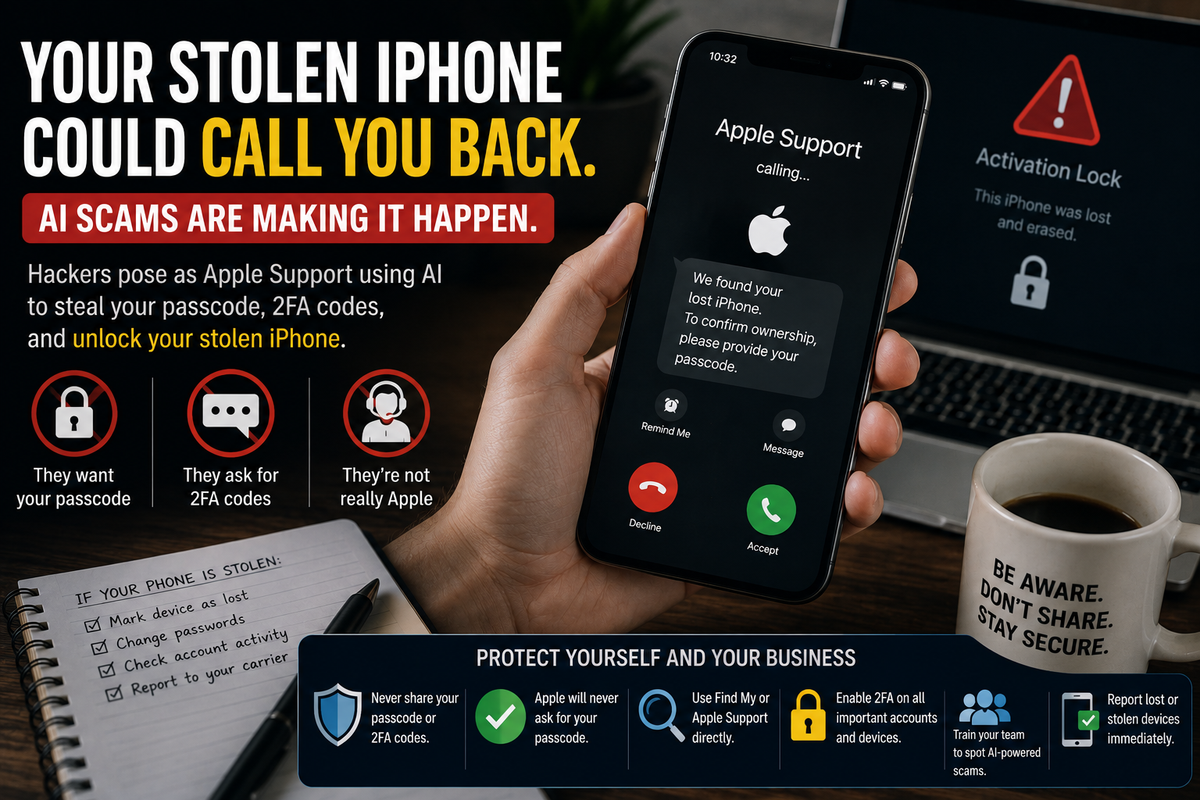
Now imagine getting a call shortly afterward from someone claiming to be Apple Support.
They know which iPhone you lost.
They know information about the device.
They tell you your phone has been found.
And they explain that they just need your passcode to verify you're the owner.
It sounds helpful.
It could also be a scam.
Security researchers recently uncovered an operation using AI-powered phone calls, text messages, emails, WhatsApp messages, and convincing phishing websites to target people whose iPhones have already been stolen.
The objective is simple:
Trick the real owner into giving criminals the information they need to unlock the stolen phone.
For small business owners and employees who use smartphones for work, this is more than an iPhone theft story.
It's a lesson in how quickly AI is making social engineering more convincing, automated, and scalable.
What Happened?
Researchers at SOCRadar investigated a phishing operation known as AnonyMousKIT.
Instead of randomly sending phishing messages and hoping someone responds, criminals using the platform can specifically target people whose iPhones have been lost or stolen.
According to the research reported by Cybernews, attackers gather information about the stolen device, potentially including its model, associated phone number, and Find My status.
That information is then used to create a more convincing scam.
A victim might receive a message saying:
"Your lost iPhone has been found."
They could then be directed to a fake location page or contacted by someone claiming to represent Apple.
And that's where AI enters the picture.
Meet the Fake AI Apple Support Agent
Researchers found that the operation used conversational AI agents capable of actually calling victims.
One AI persona was reportedly named "Alice" and presented itself as Apple Support.
The AI could carry on a conversation with the victim and was programmed to ask for sensitive information, including an iPhone passcode or two-factor authentication code.
It could even tell the victim that someone was attempting to remove Apple's Activation Lock from their stolen phone.
That's an extremely effective setup.
Your phone was actually stolen.
The caller actually knows information about it.
The caller sounds professional.
And they're talking about a problem you're desperately trying to solve.
That's exactly when people are most likely to make a mistake.
Why Do Criminals Want Your Passcode?
Modern iPhones have several protections designed to make stolen devices difficult to use or resell.
One of the most important is Activation Lock, which ties the device to its owner's Apple Account.
That's bad news for a thief.
A locked iPhone may be worth significantly less than an unlocked device.
So instead of trying to defeat Apple's security technology directly, criminals can attack something easier:
The owner.
If they convince you to provide the information needed to unlock the device, you've effectively helped them bypass the protection.
That's social engineering.
The criminal doesn't necessarily break the security system.
They convince you to open the door.
Why Should a Small Business Care About a Stolen Employee Phone?
Because smartphones aren't just phones anymore.
Think about what's accessible from yours.
You may have:
- Business email
- Microsoft 365 or Google Workspace
- Customer conversations
- Banking applications
- Accounting applications
- Saved passwords
- Cloud storage
- Business documents
- Employee information
- Customer information
- Authenticator apps
- Text-message verification codes
For a solopreneur, that one phone might provide access to practically the entire business.
Cybernews notes that a compromised Apple Account could potentially expose information including iCloud backups, Keychain credentials, and work-related data stored within Apple's ecosystem.
So the concern isn't simply:
"Can the thief resell my phone?"
It's also:
"What else could someone access if they successfully compromise my accounts?"
The Scammer May Know More Than You Expect
One reason modern phishing attacks are becoming harder to recognize is personalization.
We're accustomed to thinking of phishing as a poorly written email saying:
"Dear Customer, Your Account Have Problem."
That's becoming outdated.
In this campaign, attackers could use actual information about the stolen device to make their story more believable.
Cybernews reports that researchers found thousands of attempts across related versions of the phishing kit, including email and WhatsApp attacks, as well as recovered AI voice calls.
That means employees need to understand something important:
A scammer knowing accurate information doesn't automatically make the person legitimate.
They may know your name.
Your company.
Your phone number.
Your device.
Your job title.
Maybe even information about something that recently happened to you.
That information can become part of the scam.
AI Makes These Attacks Cheap to Scale
Here's another part small business owners should pay attention to.
AI isn't simply making scams more convincing.
It's making them cheaper to automate.
According to the Cybernews report, the recovered batch of approximately 200 AI calls cost the criminals only $19.24—roughly ten cents per call.
Think about what that means.
A criminal doesn't necessarily need an entire call center of people pretending to be customer support representatives.
AI can potentially handle conversations automatically.
That allows attackers to target more people, across more channels, at a very low cost.
The phishing operation reportedly combined:
- SMS
- Recorded calls
- Conversational AI calls
If the email doesn't fool you, maybe the text will.
If the text doesn't work, perhaps the WhatsApp message will.
If that fails, maybe "Apple Support" calls you.
That's a much more persistent type of phishing.
The Most Important Rule: Never Give Out Your Passcode
This part is simple.
Legitimate support personnel should not need your device passcode or two-factor authentication code.
SOCRadar specifically warned that legitimate support entities will not request these codes over the phone.
That means if someone calls and asks for:
- Your iPhone passcode
- An MFA code
- A verification code
- Your Apple Account password
Stop.
Don't provide it.
Even if they know your name.
Even if they know which phone you own.
Even if they know the phone was stolen.
Even if the caller ID looks legitimate.
Verify the situation independently.
Don't Use the Link the "Support Agent" Sends You
Suppose someone contacts you saying your stolen phone has been found and gives you a link to see its location.
Don't automatically use it.
Instead, access your Apple account or Find My using the app or website you already trust.
The same principle applies to business accounts.
If someone says there's a problem with Microsoft 365, don't necessarily use the link they send.
Open Microsoft 365 yourself.
If your bank supposedly detected suspicious activity, open your banking app or call the number printed on your card.
Go to the company independently instead of allowing the person contacting you to choose where you go.
It's one of the simplest ways to disrupt a phishing attack.
What Should Your Business Do When a Work Phone Is Lost or Stolen?
Small businesses should have an answer to this before it happens.
Employees should know exactly who to contact when a device disappears.
Depending on how your technology is configured, your response might include:
- Marking the device as lost
- Remotely locking or wiping it
- Changing important passwords
- Revoking active sessions
- Reviewing account activity
- Removing business access from the device
- Contacting the mobile carrier
- Monitoring business accounts for suspicious activity
The important part is speed.
An employee shouldn't spend two days wondering whether they should tell the owner their work phone disappeared.
Make reporting easy.
Employees Also Need to Expect the Follow-Up Scam
Here's the new lesson.
Recovering from a stolen device doesn't stop with securing the device.
Employees should also expect phishing attempts afterward.
Tell them:
If your phone disappears and someone suddenly contacts you saying they've found it, be suspicious immediately.
The thief—or someone working with the thief—may already know enough about the device to create a convincing story.
That unexpected Apple Support call might not be the solution.
It could be the second stage of the theft.
AI Is Changing Cybersecurity Awareness Training
We've covered AI voice cloning before, and this incident shows why that subject matters.
AI allows criminals to create convincing messages, imitate support agents, automate conversations, and interact with victims at scale.
That means cybersecurity awareness training needs to evolve too.
Employees shouldn't only be taught:
"Don't click suspicious links."
They should understand:
- AI-powered phone scams
- Voice cloning
- QR-code phishing
- MFA theft
- Fake support agents
- Account takeover attempts
- Business impersonation
- Multi-channel phishing
The technology criminals use is changing.
Employee awareness has to change with it.
How Managed Nerds Can Help
Small businesses don't need to become cybersecurity companies.
But they do need a plan for protecting the technology their businesses depend on.
Managed Nerds helps small and microbusinesses strengthen security through cybersecurity awareness training, managed IT services, Microsoft and Google Workspace support, account security, multi-factor authentication, device protection, and practical technology consulting.
We also help businesses understand emerging AI risks so employees aren't learning about the latest scam after someone falls for it.
The goal isn't to make employees suspicious of every phone call.
It's to teach them when they should stop, verify, and ask for help.
The Tech Tip: If Your Phone Is Stolen, Be Suspicious of Whoever "Finds" It
A stolen phone used to create one obvious problem:
Your phone was gone.
Now it can create a second problem.
The theft itself can become information criminals use to phish you.
If your iPhone disappears and someone claiming to be Apple Support suddenly knows details about the device, don't assume that proves they're legitimate.
Never provide your device passcode or MFA code.
Don't follow unexpected links.
Access Find My independently.
And report lost business devices immediately.
Because today's cybercriminals aren't only trying to hack technology.
Increasingly, they're using AI to convince you to unlock it for them.
Need Help Preparing Your Business for AI-Powered Scams?
AI-powered phishing, fake support agents, voice cloning, and account takeover scams are making it harder for employees to rely on the warning signs they learned years ago.
Managed Nerds helps small and microbusinesses prepare through cybersecurity awareness training, managed IT support, account and device security, and practical AI and technology training.
Your employees don't need to understand how every cyberattack works.
They need to recognize when something doesn't feel right—and know what to do next.
Want More Small Business Tech Tips?
Subscribe for straightforward tips about cybersecurity, AI, productivity, and business technology. We'll help you understand what's changing, why it matters to your business, and what practical steps you can take to stay informed and protected.