How Do I Use AI to Turn a Messy Project Into a Clean Client Update (Without Overpromising)?
When a project gets messy, clients get nervous. The worst move is staying silent. Here’s how to use AI to send calm, clear updates that protect trust without overpromising.

Every small business hits this moment:
A job runs long. Something unexpected shows up. A supplier delays. A customer changes their mind midstream. The schedule shifts.
Now you have two problems:
- The project is messy
- The client is getting anxious
And if you stay quiet, anxiety turns into assumptions. Assumptions turn into angry messages. Angry messages turn into refunds, rework, or reviews.
AI can help you write client updates faster, but only if you use it the safe way.
Because there’s a trap: AI loves to sound confident, and confident can accidentally sound like a promise.
So let’s build a simple, repeatable update system that keeps trust high without committing you to things you can’t guarantee.
Clients don’t panic because projects change. They panic because they don’t know what’s happening.
Silence is what makes a normal delay feel like a disaster.
What a “good client update” actually does
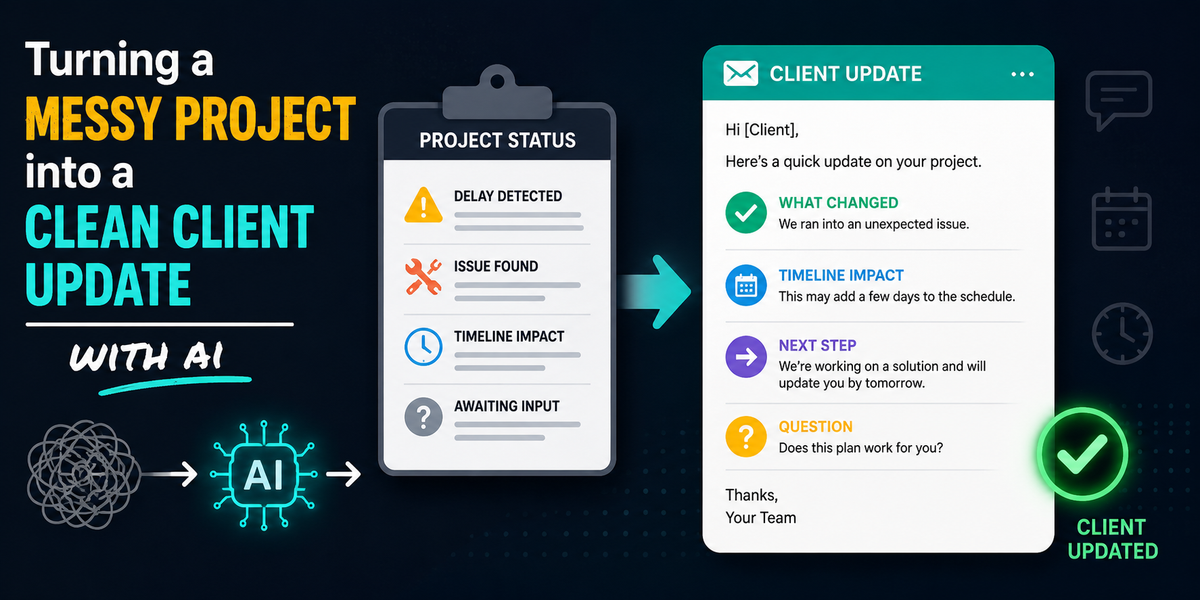
A good update has four jobs:
- Acknowledge what changed (without drama)
- Explain the cause in plain English (short)
- State the new plan (specific next step)
- Ask one clear question (so they reply)
When updates do those four things, clients calm down because they can see the path forward.
The rule that prevents overpromising
Before we get into templates, lock this in:
AI can draft the message. Humans approve timelines, scope, and commitments.
That means:
- AI can write the tone and structure
- You provide the real facts and the actual next step
- AI should not invent dates, guarantees, or “we will” statements
The “Clean Update” framework (copy/paste for every job)
Use this format every time:
1) Status headline
One sentence that states the current status.
Example:
“Quick update on your [project/service] at [location].”
2) What changed
One sentence. No blame.
Example:
“We ran into [issue] that affects the timeline.”
3) What it means
One sentence explaining impact.
Example:
“This may add about [range] to the schedule, depending on [factor].”
4) The next step
The most important part.
Example:
“Next, we’re doing [next action] on [day/time window].”
5) The question
End with one easy question.
Example:
“Does that plan work for you, or would you prefer [option]?”
This gets replies and prevents ghosting.
The best AI prompt for project updates
Use this prompt when you paste your project notes:
AI Prompt: Client Update Draft
“Write a client update using the format:
- quick status
- what changed
- what it means (no guarantees, use estimated ranges)
- next step
- one question to confirm
Tone: calm, confident, respectful.
Rules: Do not invent dates, prices, or promises. If a detail is missing, insert [NEED INFO] instead of guessing.”
This prevents AI from making up a timeline that becomes an accidental commitment.
Copy/paste templates for common “messy project” situations
Template 1: Delay (weather, scheduling, supplier)
Subject: Quick update on [Project]
Hi [Name],
Quick update on your [project/service]. We ran into a delay due to [reason].
What this means: it may push the timeline by about [range], depending on [factor].
Next step: we’re scheduled to [next action] on [day/time window].
Does that plan work for you, or would you prefer we aim for [alternate window]?
Thanks,
[Your Name]
Template 2: Unexpected issue discovered (scope risk)
Subject: Update: new issue found on [Project]
Hi [Name],
Quick update on your [project/service]. While working, we found [issue].
What this means: we have two options depending on how you’d like to handle it.
Option A: [basic fix] (fastest, lowest impact)
Option B: [more complete fix] (more durable, may add time/cost)
Next step: reply with A or B and we’ll move forward. Would you like a quick call to confirm which option fits best?
Thanks,
[Your Name]
Template 3: Customer-requested change (scope change)
Subject: Confirming the change to [Project]
Hi [Name],
Confirming the change you requested for [project/service]: [change].
What this means: it may adjust the timeline and/or cost depending on [factor].
Next step: we’ll send an updated estimate/options by [time window] for your approval before proceeding.
Does that work, or is there a deadline we should plan around?
Thanks,
[Your Name]
Template 4: “We’re waiting on you” (but keep it polite)
Subject: One quick item needed to keep things moving
Hi [Name],
Quick update on your [project/service]. We’re ready for the next step, but we need [item/info] from you first.
Once we have that, we can [next action] within [time window].
Can you send [item] today, or tell me when you’ll be able to?
Thanks,
[Your Name]
Template 5: Apology without self-sabotage (when you messed up)
Subject: Update and next step
Hi [Name],
I want to give you a quick update. We missed the mark on [issue], and I’m sorry for the inconvenience.
Here’s what we’re doing to fix it: [corrective action].
Next step: [time window / appointment option].
Does [Option A] or [Option B] work best for you?
Thanks,
[Your Name]
This acknowledges impact without writing a blank check.
The “promise words” to remove from AI drafts
Before you send any AI-assisted update, scan for these words:
- “guarantee”
- “definitely”
- “no problem”
- “we will be done by”
- “final”
- “always”
- “never”
- “no delays”
Replace with safer wording:
- “estimated”
- “we’re aiming for”
- “typical”
- “based on”
- “next step is”
- “we’ll confirm after”
Confidence is good. False certainty is expensive.
The secret weapon: “two options” reduces stress
When clients feel out of control, they panic.
Giving two clear options restores control:
- Option A: faster/simple
- Option B: more thorough/premium
Even when the news is bad, options make you look competent.
The SOP that keeps you consistent
If you want this to stick, add one rule to your workflow:
Anytime a job slips by more than 24 hours, send an update that same day.
Even if the update is short:
“Still on track, here’s the next step.”
Consistency builds trust.
Wrap-up
Messy projects happen. Silent projects create angry clients.
AI helps you send clean, calm updates quickly, as long as you follow two rules:
- use a consistent structure
- never let AI invent promises
If you want help creating a full set of client-update templates, training your team to use them, and building AI prompts that match your business tone, Managed Nerds can set up the system so your clients stay informed and your projects stay calm.