YouTube SEO for Small Businesses: Turn Helpful Videos into Search Traffic
You do not need TV-commercial videos to win on YouTube. You need searchable, helpful videos that answer buyer questions and build trust over time.

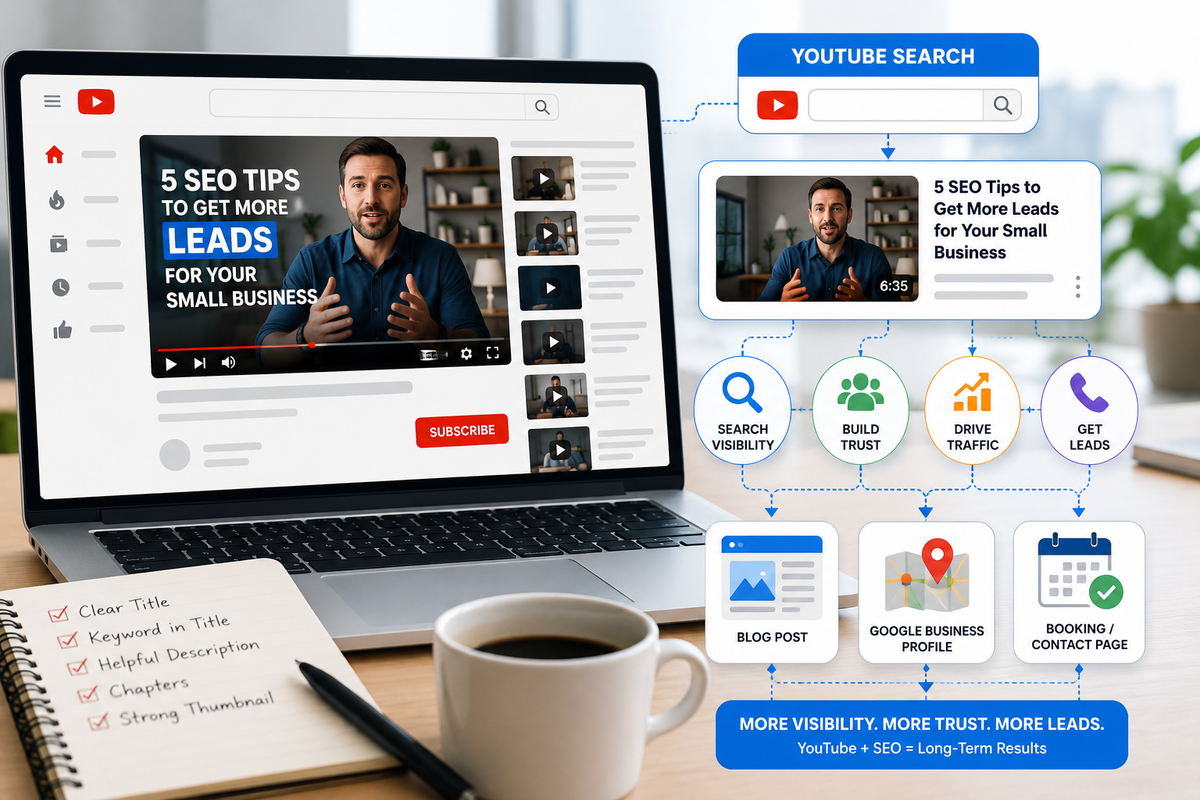
YouTube is not just a video platform.
It is a search engine.
People go there to learn, compare, troubleshoot, and decide what to do next.
That means small businesses do not need polished TV commercials to benefit from YouTube.
They need helpful videos that answer real buyer questions.
A strong YouTube video can:
- show up in YouTube search
- appear in Google search results
- support your website content
- build trust before a sales call
- answer questions you repeat constantly
- give you clips for social media
Semrush’s 2025 YouTube SEO guidance describes YouTube SEO as optimizing videos and channels, so they appear in search results and recommendations, with relevance and viewer engagement playing key roles.
So the goal is not “go viral.”
The goal is to be useful when someone is searching.
Why YouTube works for small businesses
YouTube works because buyers like seeing and hearing explanations before they commit.
They want to know:
- what something costs
- what the process looks like
- what mistakes to avoid
- whether they can trust you
- whether they need help now or later
That is perfect for service businesses.
A short, useful video can do what a sales page sometimes cannot: make the business feel real.
The best YouTube topics for small businesses
Start with questions people already ask.
“How much does it cost?”
Cost videos are powerful because people are already thinking about money.
Examples:
- “How much should a small business spend on SEO?”
- “What does Google Ads cost for a local business?”
- “How much does a website audit cost?”
- “What affects the cost of digital advertising?”
You do not always need to give exact prices. You can explain ranges and factors.
“Before you hire…”
These videos build trust.
Examples:
- “Before you hire an SEO company, ask these 5 questions”
- “Before you run Google Ads, check these 3 things”
- “Before you redesign your website, fix your lead form”
- “Before you boost a Facebook post, know this”
This kind of content positions you as a guide, not a pushy seller.
“Signs you need…”
These videos work well because they help customers self-diagnose.
Examples:
- “3 signs your website is losing leads”
- “5 signs your Google Business Profile needs cleanup”
- “Signs your ads are attracting junk leads”
- “Signs your SEO content is too vague for AI search”
“What happens next?”
These reduce fear and uncertainty.
Examples:
- “What happens after you request an SEO audit?”
- “What happens after someone fills out your contact form?”
- “What happens during an AI consultation?”
- “What happens after we review your Google Business Profile?”
If people understand the next step, they are more likely to take it.
“Mistakes to avoid”
Mistake videos are easy to watch and easy to share.
Examples:
- “Stop sending ad clicks to your homepage”
- “Do not let Performance Max eat your brand traffic”
- “The contact form mistake that kills leads”
- “The biggest reason small business ads fail”
How to optimize a YouTube video
YouTube SEO does not have to be complicated.
Start with these basics.
1) Use a clear title
Your title should sound like a real search.
Good:
“Why Are My Google Reviews Not Showing Up?”
Weak:
“Let’s Talk About Online Reputation”
Good:
“SEO vs Ads: What Should Small Businesses Do First?”
Weak:
“Marketing Strategy Thoughts”
Clear beats clever.
2) Say the keyword out loud
If your video is about Google Business Profile, say “Google Business Profile” naturally in the video.
If your video is about small business SEO, say that phrase naturally.
YouTube can use the video’s spoken content, captions, title, and description to understand context.
3) Write a useful description
Do not leave the description blank.
Include:
- what the video covers
- who it helps
- service/location context if relevant
- link to the related blog
- link to the service page
- soft CTA
Example:
“In this video, we explain why small business leads may be low quality and what filters can improve them, including service area, form fields, keyword intent, and call tracking. Managed Nerds helps small businesses improve SEO, tracking, and lead generation.”
4) Use chapters for longer videos
If your video is longer than a few minutes, chapters can help viewers jump to what they need.
Recent YouTube optimization coverage continues to emphasize chapters and key moments as useful discovery and user-experience tools, especially when they are clear and accurate.
Simple chapter sections:
- 0:00 What this video covers
- 0:35 Why this matters
- 1:20 Common mistake
- 2:15 What to fix first
- 3:10 Next step
5) Use a thumbnail with one clear idea
Do not cram ten things into the thumbnail.
Use one visual idea:
- confused website owner
- form with too many fields
- search bar
- map pin
- phone call
- checklist
For most small businesses, simple and clear works better than dramatic and cluttered.
6) Link video and website content together
A YouTube video should not live alone.
Connect it to:
- the related blog
- the related service page
- a checklist or lead magnet
- your Google Business Profile post
- an email newsletter
This is how YouTube supports SEO.
The video builds trust. The blog gives depth. The service page gives the next step.
How to turn one blog into YouTube content
You already have the script.
Take a blog and create:
1) One short video
Use the intro and main takeaway.
Example:
“Why are your leads low quality? Here are the first three filters to check.”
2) One longer video
Use the full structure of the blog:
- problem
- why it matters
- 3–5 fixes
- example
- next step
3) Three Shorts
Pull three quick tips:
- one mistake
- one checklist item
- one myth
This gives you multiple YouTube assets from one blog.
What small businesses should not do on YouTube
Avoid:
- making every video a sales pitch
- posting once and disappearing
- using vague titles
- skipping descriptions
- ignoring audio quality
- making videos too long without structure
- hiding the next step
You do not need expensive production.
But you do need clarity.
A simple YouTube plan for a small business
Start with one video per month.
That is enough.
Monthly workflow:
- Pick one blog topic
- Record a 3–6 minute video explaining it
- Cut 2–3 short clips
- Add the video to the blog
- Share clips on social
- Link the video from a related email or GBP post
That turns one topic into a full content system.
What to measure
Do not obsess over views only.
Track:
- watch time
- clicks to website
- comments/questions
- subscribers
- leads mentioning the video
- videos that support sales conversations
A video with 80 views can still be valuable if three serious prospects watched it before calling.
The bottom line
YouTube SEO is not about becoming an influencer.
It is about answering the questions your customers already ask.
Start with:
- cost questions
- before-you-hire topics
- signs you need help
- what happens next
- mistakes to avoid
Make the title clear. Say the topic out loud. Write a useful description. Connect the video back to your website.
Need help turning your blogs into searchable videos that support small business SEO? Managed Nerds offers practical SEO and marketing support to help you choose topics, structure videos, repurpose content, and connect YouTube traffic back to your website and leads.
Thank you for reading. If you’d like more small business SEO tips, subscribe for updates.