Windows 11 Is Getting Better Android Integration. Here's Why Small Businesses Should Care.
Windows 11's improved Android integration can help small businesses work more efficiently. Learn how the new features improve productivity while keeping your devices secure.

If you're like many small business owners, your work doesn't stop when you leave your desk.
You answer customer messages from your phone.
Take photos at job sites.
Approve invoices.
Respond to emails.
Then you sit down at your computer and have to move everything over manually.
Microsoft is working to make that process much smoother.
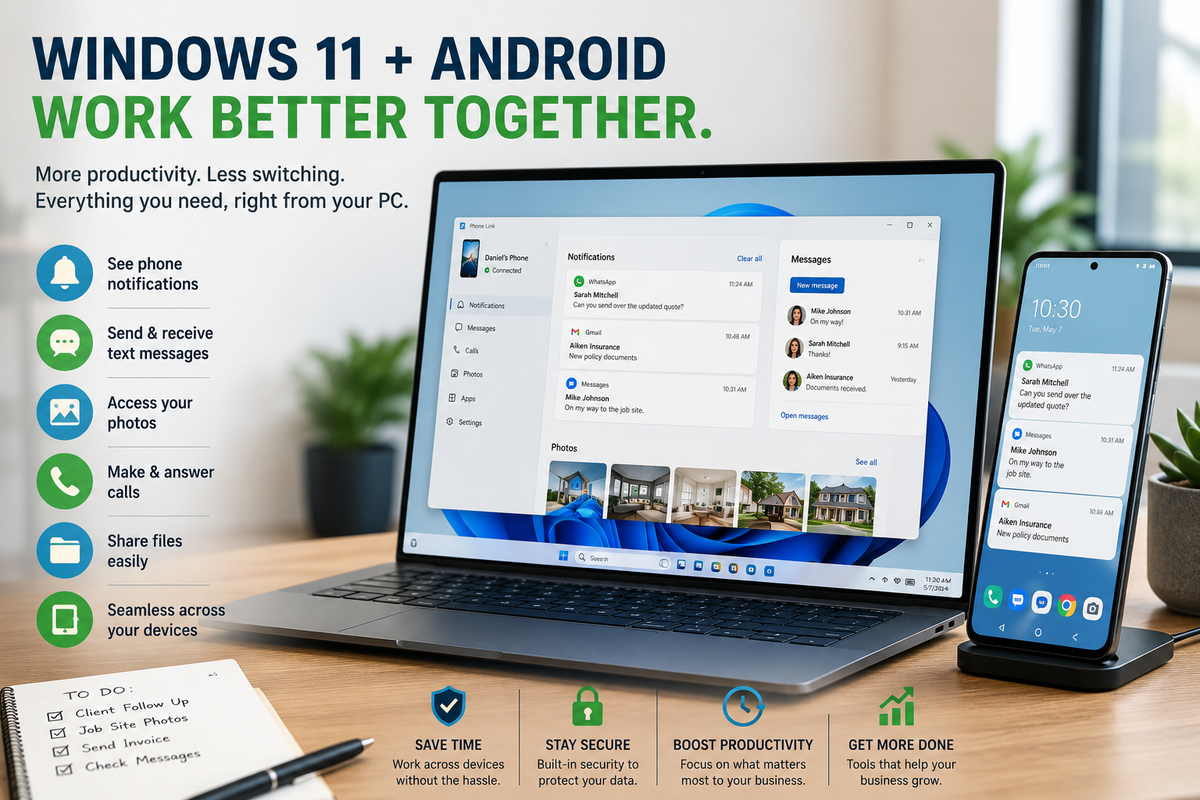
Recent updates to Windows 11 are expanding how Android phones integrate with Windows PCs, making it easier to access notifications, files, photos, messages, and other phone features directly from your computer.
For many small businesses, that could mean spending less time switching between devices and more time getting work done.
What's Changing?
Microsoft continues to improve the connection between Windows 11 and Android devices through its Phone Link experience and related features.
Depending on your device and update availability, users may be able to:
- View phone notifications on their PC
- Access recent photos without emailing them to themselves
- Send and receive text messages
- Make and answer phone calls from a computer
- Share files more easily between devices
- Continue work across phone and PC with fewer interruptions
The goal is simple:
Make your phone feel like an extension of your computer rather than a completely separate device.
Why This Matters for Small Businesses
At first glance, this may seem like a convenience feature.
In reality, it can improve day-to-day productivity for many businesses.
Imagine you're:
A contractor taking photos of a completed job.
A realtor capturing listing photos.
An insurance agent receiving customer documents.
A consultant texting clients throughout the day.
Instead of emailing files to yourself or digging through cloud folders, those items may already be available from your computer.
Small time savings repeated throughout the day often add up.
Better Workflow, Fewer Interruptions
One of the biggest productivity killers is constantly switching devices.
Phone.
Computer.
Back to the phone.
Back to the computer.
Each interruption breaks your focus.
Better integration allows many routine tasks to happen from one workspace instead of two.
For busy business owners, that's a welcome improvement.
Convenience Shouldn't Replace Security
While better integration is useful, businesses should also think about security.
When phones and computers become more connected, protecting both devices becomes even more important.
If one device is compromised, it may affect the other depending on how accounts and data are connected.
That's why businesses should continue following good security practices.
A Few Best Practices
As you take advantage of features like Phone Link and device synchronization, remember to:
- Keep Windows and Android devices updated.
- Enable multi-factor authentication (MFA) on important accounts.
- Lock devices with strong PINs or biometrics.
- Be cautious when connecting personal devices to business accounts.
- Review which devices have access to your Microsoft account.
- Remove old devices you no longer use.
Convenience works best when it's paired with security.
Why Employee Training Still Matters
Many cybersecurity issues don't happen because of technology.
They happen because people don't understand how the technology works.
Employees should know:
- Which devices are approved for business use.
- How to securely transfer files.
- How to recognize suspicious prompts or login requests.
- Why updates shouldn't be ignored.
- How to protect customer information while working across multiple devices.
As businesses become more connected, employee awareness becomes just as important as the technology itself.
How Managed Nerds Helps Businesses Get the Most From Technology
New features are exciting, but businesses often don't have time to figure out how to deploy them securely.
That's where Managed Nerds can help.
Managed Nerds helps small businesses:
- Configure Windows and Microsoft 365 environments
- Secure business devices
- Implement identity and access management
- Keep systems updated
- Provide managed IT support
- Deliver cybersecurity awareness training
- Help businesses adopt new technology safely
- Offer AI and technology consulting for modern workplaces
The goal isn't just to install technology.
It's to make sure it actually improves the way your business operates while keeping your data protected.
Final Thought
The latest Windows 11 and Android integration features won't revolutionize every business overnight.
But they represent another step toward a more connected workplace.
For small businesses, that means fewer interruptions, faster access to information, and a smoother workflow between mobile devices and computers.
Just remember:
The more connected your technology becomes, the more important it is to keep those devices secure.
Used properly, these new features can help your business become more productive without sacrificing security.
Need Help Making Technology Work Better for Your Business?
Whether you're looking to improve productivity, strengthen cybersecurity, or get more value from Microsoft 365 and Windows, Managed Nerds can help you build a technology environment that's both efficient and secure.
From managed IT services and cybersecurity training to technology consulting and ongoing support, we help small businesses make smarter technology decisions every day.
Want More Simple Tech Tips Like This?
Subscribe for practical technology and cybersecurity insights designed specifically for small business owners who want to stay informed, productive, and protected in an ever-changing digital world.