How Can Roofing Companies Use AI to Handle Storm Season Without Losing Leads?
Storm season can bring roofing companies more calls, photos, questions, and quote requests than they can handle. Here’s how AI can help organize the chaos.

Storm season can be a blessing and a nightmare for roofing companies.
The phone starts ringing.
Photos start coming in.
Customers ask if the damage is serious.
People want inspections fast.
Insurance questions pile up.
Estimate requests stack up.
Follow-ups get missed.
The crew is already busy.
The owner is trying to keep everything from falling apart.
And somewhere in that chaos, good leads get lost.
Not because the roofing company is bad.
Not because the owner does not care.
Not because the team is lazy.
It happens because storm season creates more communication than a small roofing business can comfortably manage.
Here is the tabloid truth:
Storm season brings leads… but AI can stop the chaos.
Not by replacing roofers.
Not by diagnosing damage from a photo.
Not by making promises about insurance.
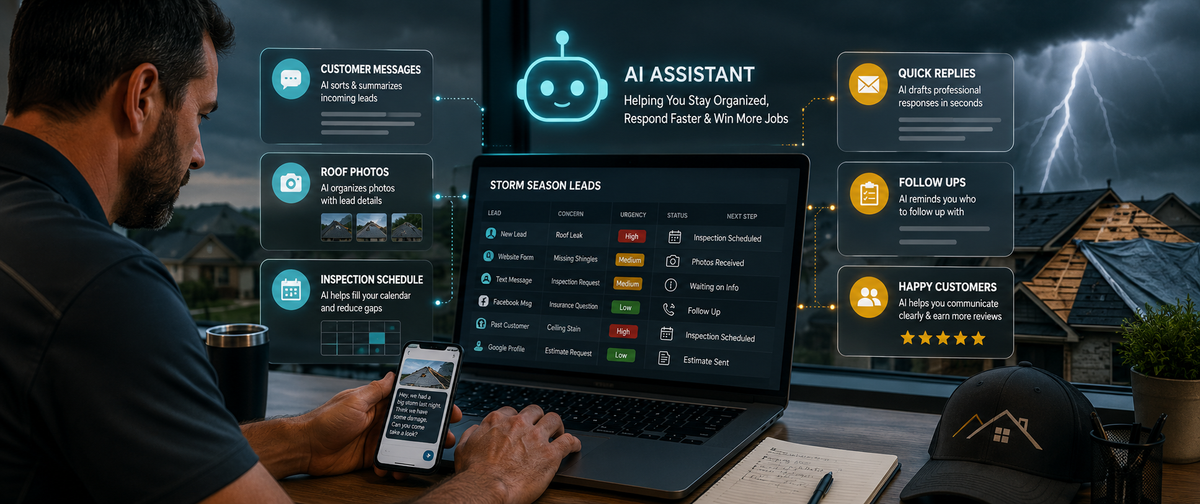
AI can help roofing companies organize messages, prepare follow-ups, sort customer details, create response templates, and build a better lead-handling system before the next storm hits.
Why storm season gets messy fast
Roofing companies deal with a rush of information after bad weather.
A customer might send:
- roof photos
- ceiling stain photos
- gutter damage photos
- a short text with no address
- a voicemail with missing details
- an insurance question
- a request for “just a quick estimate”
- a panic message after seeing shingles in the yard
Now multiply that by 10, 20, or 50.
A small roofing business may have leads coming from:
- phone calls
- website forms
- Facebook messages
- Google Business Profile
- texts
- emails
- referrals
- neighborhood groups
- past customers
- insurance contacts
That is a lot of information to track.
If there is no system, the business ends up running on memory, screenshots, sticky notes, and “I thought you called them back.”
That is how leads slip through the cracks.
What AI can help roofing companies do
AI is not a roofer.
It should not decide whether a roof needs repair or replacement.
But AI can help with the communication and organization around the work.
AI can help roofing companies:
- sort incoming lead details
- draft quick response messages
- summarize customer notes
- organize roof photos with customer information
- create inspection scheduling scripts
- prepare follow-up reminders
- turn common questions into FAQs
- write post-inspection customer updates
- create review request messages
- build internal checklists
- organize storm-season workflows
That is practical AI.
It does not replace the professional. It helps the professional keep up.
What AI should not do for a roofing company
This part matters.
AI should not:
- diagnose roof damage from photos
- promise a roof qualifies for insurance coverage
- guarantee claim outcomes
- estimate repair costs without human review
- tell a customer their roof is safe
- replace an in-person inspection
- create legal or insurance advice
- send sensitive information without approval
- invent missing details
- make commitments your team cannot keep
AI can draft.
AI can organize.
AI can summarize.
AI can remind.
But the roofer still inspects, decides, confirms, and approves.
That is the guardrail.
Use Case 1: Sort storm leads by urgency
After a storm, not every inquiry is the same.
Some people have active leaks.
Some have missing shingles.
Some have cosmetic concerns.
Some want an inspection because their neighbor got one.
Some are shopping quotes.
Some are past customers who need help quickly.
AI can help sort leads into simple categories.
For example:
- urgent leak
- visible exterior damage
- inspection request
- estimate follow-up
- insurance question
- past customer
- not enough information
AI Prompt: Storm Lead Sorter
“Review this roofing lead information and sort it into one of these categories: urgent leak, visible exterior damage, inspection request, estimate follow-up, insurance question, past customer, or missing information.
Do not diagnose damage.
Do not make promises.
List what information is missing and suggest the next communication step.”
This helps the office or owner know what to handle first.
Use Case 2: Create a better first-response message
Speed matters after a storm.
But fast does not mean careless.
A good first response should:
- acknowledge the customer
- collect missing details
- set expectations
- avoid promises
- move toward scheduling
AI Prompt: Roofing First Response
“Write a short first-response text for a roofing company after a storm.
The customer says: [paste message].
Tone: calm, professional, helpful.
Ask for address, best contact number, photos if available, and whether there is an active leak.
Do not diagnose damage or promise insurance coverage.”
Example:
“Hi [Name], thanks for reaching out. I’m sorry you’re dealing with this after the storm. To help us route this correctly, can you send the property address, best callback number, a few photos if safe to take, and let us know if there is an active leak inside the home?”
That message is simple, helpful, and useful.
Use Case 3: Turn messy customer messages into clean lead notes
Customers rarely send perfect information.
You may get something like:
“Hey, storm came through last night, think we lost shingles. There’s a spot in the bedroom ceiling too. Can someone come look? I’m near Evans.”
That is useful, but it needs to become a clean lead note.
AI can help summarize it.
AI Prompt: Customer Message to Lead Note
“Turn this customer message into a clean roofing lead note.
Include: customer concern, possible urgency, location, missing information, and next step.
Do not diagnose the roof condition.
Do not add facts not provided.”
Output might look like:
- Concern: possible missing shingles after storm; ceiling spot mentioned
- Urgency: possible interior leak or moisture concern
- Location: near Evans, exact address needed
- Missing information: full address, contact number, photos, leak status
- Next step: request details and schedule inspection
That is much easier to work from.
Use Case 4: Organize photo submissions
Roofing companies often receive photos by text, email, and message apps.
The problem is not the photos themselves.
The problem is connecting photos to:
- the right customer
- the right address
- the right date
- the right issue
- the right follow-up step
AI can help create a photo intake checklist.
AI Prompt: Roof Photo Intake Checklist
“Create a photo intake checklist for a roofing company after a storm.
Include what information should be collected with customer-submitted photos.
Make it clear that photos do not replace an inspection.
Keep the checklist simple enough for office staff to use.”
A good checklist might include:
- customer name
- property address
- date photos were taken
- where each photo was taken
- whether there is active leaking
- whether interior damage is visible
- best callback number
- preferred inspection time
- notes for inspector
This helps prevent the “which house was this?” problem.
Use Case 5: Draft inspection scheduling messages
After storm damage, customers want to know when someone can come out.
A scheduling message needs to be clear and realistic.
Bad message:
“We’ll get someone out ASAP.”
That sounds nice, but it can create expectations you may not meet.
Better message:
“We’re scheduling storm inspections in the order requests are received and prioritizing active leaks. We have availability [timeframe]. Does [Option A] or [Option B] work?”
AI Prompt: Inspection Scheduling Message
“Write a roofing inspection scheduling text after a storm.
Tone: helpful and professional.
Explain that active leaks may be prioritized.
Offer two appointment windows.
Do not overpromise.
Do not use vague phrases like ‘ASAP.’”
This helps the business sound organized even when demand is high.
Use Case 6: Create customer update templates
Storm-season customers get anxious.
They want to know:
- Did you receive my photos?
- When is the inspection?
- What happens after the inspection?
- When will I get the estimate?
- Should I contact insurance?
- What if it rains again?
AI can help roofing companies create approved update templates for common situations.
Examples:
Photo received
“Thanks, we received the photos. These will be added to your file for the inspector to review. Photos help us understand the concern, but an inspection is still needed before we can confirm the condition.”
Inspection scheduled
“You’re scheduled for [date/time window]. Please make sure we have access to the property and let us know if there is active leaking inside the home.”
Estimate in progress
“Thanks for your patience. We’re preparing your estimate based on the inspection notes and will send it once it has been reviewed.”
Waiting on customer
“We’re ready for the next step, but we still need [missing item]. Once we receive that, we can move forward.”
These messages save time and reduce repeated typing.
Use Case 7: Build a storm damage FAQ
Roofing companies answer the same storm questions over and over.
AI can help turn those questions into a FAQ.
Common questions include:
- What should I do if my roof is leaking?
- Should I take photos?
- Do I need an inspection?
- Can you tell from photos if I need a new roof?
- Should I call insurance first?
- How long does an inspection take?
- What happens after the inspection?
- Can small damage become a bigger problem?
- What should I do before the next rain?
AI Prompt: Storm Damage FAQ
“Create a storm damage FAQ for a roofing company.
Audience: homeowners after a storm.
Tone: calm, practical, and professional.
Do not give legal or insurance advice.
Do not promise claim outcomes.
Encourage customers to schedule a professional inspection when appropriate.”
This FAQ can go on the website, Google Business Profile, email replies, and social media.
It saves time and helps customers take the next step.
Use Case 8: Follow up after estimates
A customer gets an estimate and then goes quiet.
That does not always mean they are gone.
They may be reviewing options.
They may be waiting on insurance.
They may have questions.
They may be overwhelmed.
AI can help write follow-ups that do not sound pushy.
AI Prompt: Roofing Estimate Follow-Up
“Write a short follow-up email for a roofing company after sending an estimate.
Tone: helpful, professional, not pushy.
Ask if they have questions about the scope, timeline, or next step.
Do not pressure the customer.
Do not mention discounts.”
Example:
“Hi [Name], I wanted to follow up on the estimate we sent for [property/address]. If you have questions about the scope, timeline, or next step, we’re happy to walk through it with you. Would you like us to schedule a quick call?”
This keeps the opportunity alive without sounding desperate.
Use Case 9: Create internal storm-season checklists
Storm season exposes weak processes.
If your team does not know who handles what, chaos grows.
AI can help build internal checklists for:
- lead intake
- active leak calls
- photo collection
- inspection scheduling
- customer follow-up
- estimate tracking
- crew communication
- post-job review requests
- emergency escalation
- end-of-day lead review
AI Prompt: Storm Season Workflow Checklist
“Create a storm-season workflow checklist for a small roofing company.
Include steps for lead intake, urgency sorting, photo collection, inspection scheduling, customer updates, estimate follow-up, and daily review.
Keep it simple for a small team.”
This gives your team a shared process instead of everyone guessing.
Use Case 10: Track the leads you already paid for
Storm-season marketing can get expensive.
Whether leads come from ads, SEO, referrals, signs, social media, or Google Business Profile, they need to be tracked.
AI can help summarize lead sources and follow-up status.
A simple tracker might include:
- customer name
- address
- lead source
- concern
- urgency
- photos received
- inspection scheduled
- estimate sent
- follow-up date
- status
- notes
AI Prompt: Roofing Lead Tracker
“Create a simple lead tracker for a small roofing company after a storm.
Include columns for customer details, lead source, urgency, photos, inspection date, estimate status, follow-up date, and next action.”
This helps prevent leads from vanishing into text messages and memory.
Why this matters for roofing companies
Roofing companies do not lose leads only because the phone rings too much.
They lose leads because the process behind the phone is too messy.
AI can help roofing companies:
- respond faster
- collect better information
- avoid repeated typing
- organize customer details
- track follow-ups
- create clear FAQs
- reduce confusion
- protect the owner’s time
- improve customer experience
The roof still needs a professional.
The business process needs a system.
AI helps with the system.
A simple storm-season AI setup
If a roofing company wants to start small, this is enough:
Create 5 approved message templates
- first response
- active leak response
- photo received
- inspection scheduled
- estimate follow-up
Create 3 checklists
- lead intake
- photo intake
- inspection scheduling
Create 1 tracker
Use a spreadsheet or CRM to track every storm lead.
Create 1 FAQ
Answer the top 10 customer questions after a storm.
Train the team
Make sure everyone knows what AI can help with and what requires human review.
That is a practical starting point.
No overcomplication required.
The safety rule: AI organizes, roofers decide
This should be the rule for every roofing company using AI.
AI can organize the message.
AI can draft the reply.
AI can summarize the notes.
AI can create the checklist.
AI can help track the lead.
But roofers decide what the roof needs.
That protects the business, the customer, and the relationship.
Wrap-up
Storm season can bring opportunity, but it can also bury a small roofing company in calls, photos, texts, estimates, and follow-ups.
AI can help bring order to the rush.
Used properly, AI can help roofing companies sort leads, draft responses, organize photos, schedule inspections, create customer updates, build FAQs, and track estimates without replacing professional judgment.
If your roofing company wants to use AI without creating new risks, Managed Nerds can help build safe workflows, approved prompts, templates, and lead-tracking systems that fit the way small service businesses actually work.