How Do I Use AI to Write Service Area Pages Without Getting Penalized for Spam?
Service area pages can drive leads fast, or tank your visibility if they’re thin and repetitive. Here’s how to use AI to write location pages the right way, without spam vibes.

If you’re a service business, you’ve probably heard this advice:
“Make a page for every city you serve.”
And you’ve probably also seen the lazy version of that advice:
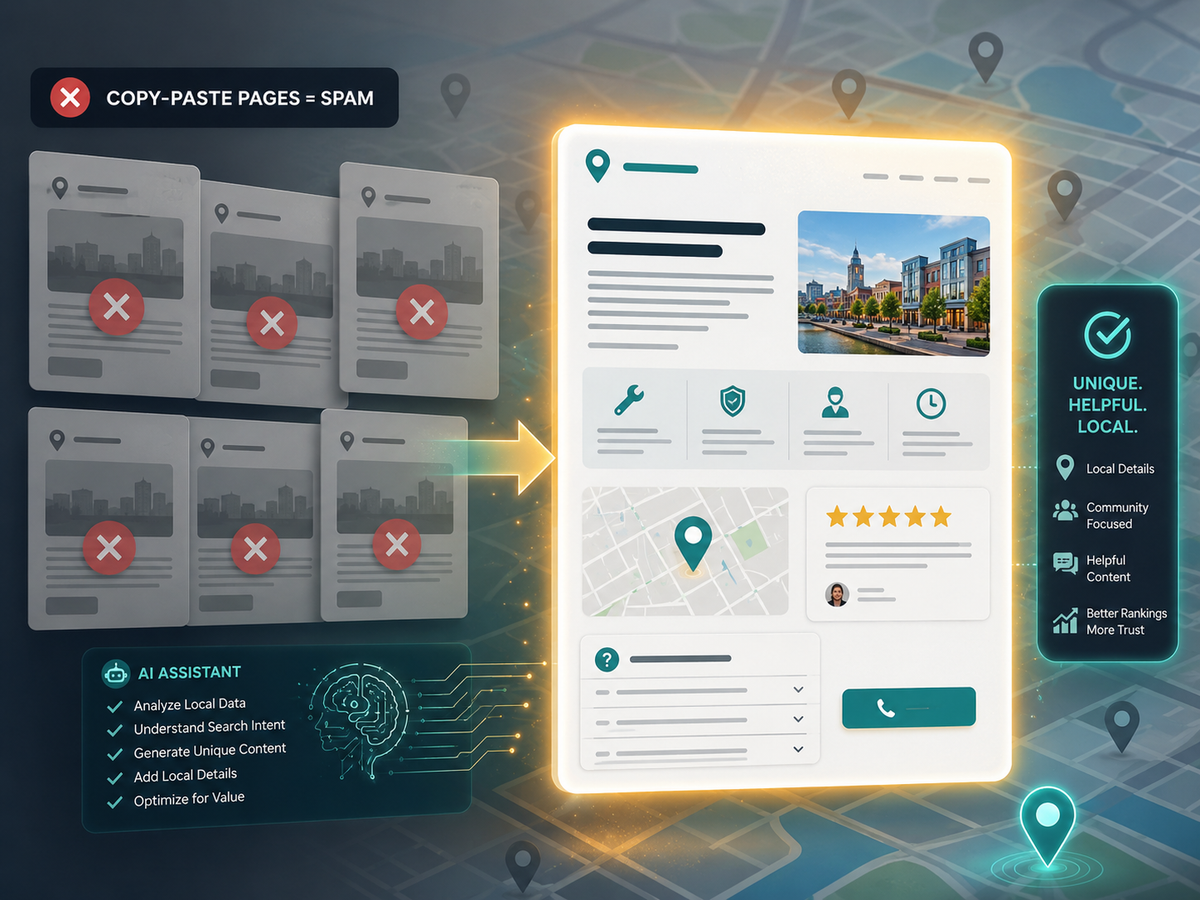
Twenty pages that are the same, except the city name gets swapped.
That’s how small businesses end up with “location pages” that feel like spam. They don’t rank well, they don’t convert, and sometimes they make the whole site look lower quality.
Now AI makes it tempting to scale this fast.
But here’s the truth:
AI can help you create service area pages, but copy-paste city pages can backfire.
The goal is not “more pages.”
The goal is more helpful pages that prove you actually serve that area and solve specific problems there.
Let’s build them the right way.
What a “spammy” location page looks like
If your page is basically:
“Plumbing in Evans, GA. We provide quality plumbing in Evans, GA. Call us for plumbing in Evans, GA.”
That page isn’t local. It’s a template.
And customers feel it too. It looks like a lead farm, not a real business.
Spam signals usually include:
- same paragraphs repeated across cities
- no unique details, photos, or examples
- vague claims like “best service”
- identical FAQs
- identical headings
- no real reason for the page to exist
What a “good” service area page looks like
A strong service area page answers these questions fast:
- Do you actually serve this area, or are you just naming it?
- What services do you do here most often?
- What problems are common in this area?
- What’s included, what’s not, and what happens next?
- Why should I trust you?
That’s what AI should help you build: structure, clarity, and local relevance.
The right strategy: fewer pages, better pages
You do not need 50 thin pages.
A smarter approach for small businesses:
- Build strong pages for your top 5–15 service areas
- Make each page legitimately useful
- Use real proof where possible (photos, examples, reviews)
- Link them properly from service pages and your main service area hub
Quality beats volume almost every time.
The “Service Area Page” framework that won’t feel spammy
Use this structure for every city page.
A clear headline that matches search intent
Example:
“Roof Repair in Evans, GA: What’s Included and What to Expect”
Not:
“Evans Roofing Services Company Best Roofing Evans”
Clarity wins.
A short local intro
2–4 sentences:
- what you do
- who you help
- confirmation you serve the area
- what the customer should do next
A “Services we do most here” section
Don’t list everything you’ve ever done.
Pick 3–6 services that actually match what people search and what you want to sell.
“Common problems in this area” section
This is what makes the page feel real.
Examples:
- “Storm damage and emergency repairs”
- “Older homes needing updated wiring”
- “High humidity and moisture issues”
- “New builds with quick-turn scheduling needs”
You don’t need to overclaim. You just need to be specific.
What’s included
This reduces tire-kickers and increases trust.
Bullets:
- what the customer gets
- how the process works
- what you deliver (report, photos, warranty info, etc.)
FAQs that are actually local
Not “What is your service?” repeated forever.
Ask and answer:
- “Do you travel to [neighborhoods]?”
- “How soon can you get here from your base?”
- “Are there trip fees for this area?”
- “What’s your typical turnaround time here?”
Proof
This is where most location pages fail.
Add at least one:
- a local review snippet (even if it’s county-level)
- before/after photo from a nearby job
- a short mini case study (3–5 sentences)
- a “recent work” bullet list
If you have zero proof, keep the page smaller and don’t pretend.
Strong CTA
Make it easy:
- “Request a quote”
- “Check availability”
- “Text photos for a quick estimate”
- “Book a call”
How to use AI without creating duplicate city pages
Here’s the safe way to use AI:
Step 1: Feed AI a “local facts” block
For each city, create a simple input block:
- City: Evans, GA
- Service areas: neighborhoods or nearby communities you actually serve
- Top services: 3–6
- Common problems: 3 bullets
- Response time notes: typical timing or constraints
- One proof item: review, photo, mini story
- Any unique policies: trip fees, scheduling windows, etc.
Now AI has real ingredients.
Step 2: Use a strict prompt that blocks fluff and duplication
Copy and paste this:
AI Prompt: Service Area Page Draft
“Write a service area page for [CITY].
Rules: do not reuse generic paragraphs. Avoid hype words like ‘best’ or ‘top-rated’ unless supported by proof.
Include these sections: Intro, Services We Do Most Here, Common Problems in This Area, What’s Included, FAQs (6), Proof, Next Step CTA.
Keep it helpful, specific, and written for a local customer.
If a detail is missing, add a placeholder note in brackets instead of guessing.”
This prevents AI from inventing “local flavor” that isn’t real.
Step 3: Run a duplication check
Before publishing:
- compare the page to your other city pages
- make sure headings and FAQs are not identical
- make sure at least 30–40% of the body content is unique
If every page looks the same, Google and customers will treat it the same.
The fastest way to make each page unique
If you struggle to get unique content, use these “uniqueness anchors”:
- One local photo from that area (or nearby)
- One short “recent job” mini story
- One area-specific FAQ
- One service you emphasize in that city
- One map snippet or service boundary statement (truthful)
You don’t need to write a novel. You need a reason for the page to exist.
Mistakes to avoid when scaling service area pages with AI
- Publishing dozens of pages at once with near-identical text
- Using the same FAQs on every page
- Listing cities you don’t actually serve
- Creating “city pages” that don’t link to anything else
- Forgetting to add a clear CTA or contact path
- Letting AI guess details like pricing, timelines, or policies
AI is a helper, not a local expert. Keep it honest.
Final Thought
Service area pages can be an amazing lead engine, but only if they’re real.
Use AI to scale the structure, not the fluff:
- real local inputs
- unique anchors
- helpful sections
- proof
- strong calls to action
Need help building service area pages that actually rank and convert, without the spam vibe? We can help with small business SEO and location page strategy that fits tiny teams and real budgets. Check out Managed Nerds if you want this built correctly the first time.