How Do I Use AI to Reduce Missed Appointments and No-Shows?
No-shows feel random, but most are preventable. Here’s how small businesses use AI to confirm details, send reminders, and reduce missed appointments without sounding pushy.

If you run a small service business, you’ve felt it:
You hold a slot. You drive out. You block time. You show up ready to work.
And… nobody answers.
No-shows aren’t just annoying. They’re expensive:
- wasted time
- wasted fuel
- missed opportunities
- staff frustration
- broken schedules for the rest of the day
The good news is that no-shows aren’t always “people being flaky.”
A lot of no-shows happen because your process leaves too much room for confusion:
- wrong address
- unclear time window
- customer forgot
- customer assumed it was “next week”
- customer didn’t feel committed
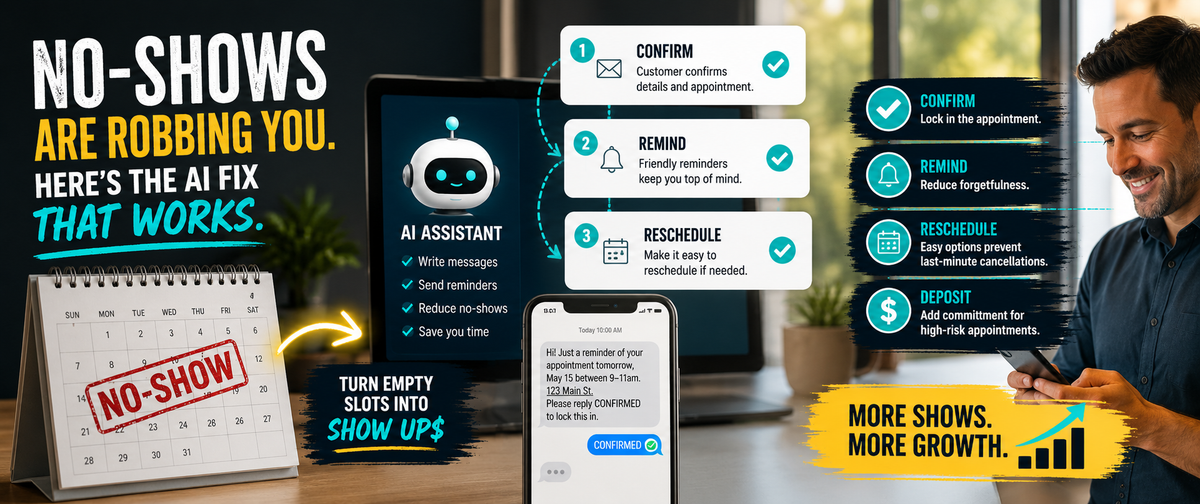
AI won’t fix every one of those, but it can dramatically reduce them by making your scheduling communications consistent, clear, and repeatable.
No-shows aren’t random. They’re a broken confirmation system.
If you build a better confirmation system, you stop bleeding time.
The 4 most common reasons customers no-show
Before we fix it, let’s call it what it is.
1) They never truly confirmed
They said, “That should work,” but they never explicitly agreed to:
- date
- time
- location
- service
2) They forgot
Simple. Humans are busy.
3) They got anxious or changed priorities
Especially for estimates, inspections, or anything involving money.
4) They didn’t feel any cost to canceling
If there’s no friction or commitment, canceling feels easy.
Your job is to reduce confusion and add commitment, without sounding pushy.
The best no-show prevention tool is a 2-step confirmation rule
This is the single biggest win you can implement.
The 2-step rule
Step 1: Send appointment details in writing.
Step 2: Require a reply that confirms those details.
No confirmation reply, no appointment.
That sounds strict, but it’s fair. It protects your schedule and improves customer reliability.
AI helps you write these messages quickly and consistently.
The “No-Show Reduction” workflow (simple and realistic)
Step 1: Use AI to draft the confirmation message
Your confirmation message needs five things:
- day and date
- time window
- address/location
- service requested
- what the customer should do next
AI prompt: Appointment confirmation
“Write a confirmation message in a calm, friendly tone.
Include: date, time window, address, service, and what we need from the customer before arrival.
End with a single question asking them to reply ‘CONFIRMED’.”
Now your team doesn’t improvise.
Template: Confirmation message
“Hi [Name], you’re scheduled for [Day, Date] in the [Time Window].
Address: [Address].
Service: [Service].
Please reply CONFIRMED to lock this in. If anything changed, reply with the best time to reschedule.”
Step 2: Send a 24-hour reminder (and a 2-hour reminder if you do tight windows)
Most no-shows happen because people forget or misremember.
Template: 24-hour reminder
“Quick reminder: we’re scheduled for [Day/Time Window] at [Address] for [Service].
If you need to reschedule, reply here today and we’ll find a better time.”
Template: 2-hour reminder (optional)
“We’re on track for today. Estimated arrival is [Time Window].
Reply YES to confirm you’ll be there.”
These messages are short, respectful, and they reduce “I forgot” excuses.
AI can generate them for every appointment with consistent tone.
Step 3: Make rescheduling easy (or customers will ghost)
A lot of customers don’t cancel because they’re bad people. They cancel because rescheduling feels awkward.
So give them a path:
Template: Reschedule option
“No worries, it happens. I can do [Option A] or [Option B]. Which works best?”
This keeps the relationship intact and keeps your schedule full.
Step 4: Add commitment for high-risk appointment types
Not every appointment needs a deposit.
But some do.
High-risk appointments often include:
- estimates with long drive time
- consultation-heavy visits
- urgent “same day” requests
- repeat reschedulers
- last-minute weekend slots
A simple policy helps:
- deposit to hold appointment
- fee applied to service
- cancellation window
AI can help write the policy language clearly, but you decide the terms.
Template: Deposit language (friendly)
“To reserve this slot, we require a [$X] hold fee, which is applied to the service. If you reschedule with 24 hours notice, it rolls to the new date.”
This reduces casual no-shows dramatically.
The “No-Show SOP” you can run weekly
Here’s a simple operational routine.
Daily
- Confirm every appointment requires a “CONFIRMED” reply
- Send 24-hour reminder
- Send same-day reminder for tight windows
Weekly
- Review no-shows and identify patterns
- Mark repeat no-show clients as “deposit required”
- Update your scripts if customers keep misunderstanding something
This turns “no-shows” into a managed problem, not a mystery.
AI prompts that make this system fast
Use these to generate messages without thinking.
Prompt: Two time options
“Write a scheduling message offering two appointment windows. Keep it short and friendly. End with one question.”
Prompt: Confirmation request
“Write a confirmation request that includes date, time window, address, service, and asks for reply CONFIRMED.”
Prompt: Reschedule reply
“Write a reschedule message that’s calm and non-judgmental. Offer two options and ask them to pick one.”
Prompt: No-show follow-up (professional)
“Write a polite message after a missed appointment. State we arrived and couldn’t reach them. Ask if they want to reschedule. Mention that future bookings require confirmation/deposit.”
The “after a no-show” message that protects your business
This is where owners often get emotional. Don’t.
Keep it calm, factual, and policy-based.
Template: After no-show
“Hi [Name], we arrived for the scheduled appointment at [Time] and couldn’t reach you.
If you’d like to reschedule, I can offer [Option A] or [Option B].
To reserve future appointments, we require a confirmation reply (and in some cases a hold fee).
Which option would you prefer?”
No blame or drama. Just structure.
Final Thought
No-shows can wreck a small business schedule, but they’re usually a process problem.
AI helps by making your scheduling system consistent:
- 2-step confirmation rule
- reminders that reduce forgetfulness
- easy reschedule paths
- clear commitment policies when needed
If you want help setting this up as an SOP, building message templates for SMS and email, and training your team to use AI safely without sounding robotic, Managed Nerds can implement the full system for you.