The Content Repurposing Machine: Turn One Blog Into 10 Marketing Pieces
One good blog should not live once and disappear. Here’s how to repurpose one blog into 10 useful marketing pieces for SEO, social, email, and ads.

If you’re writing a blog, posting it once, and then moving on forever… you’re leaving a lot of marketing value on the table.
A good blog should not be a one-time task.
It should become a content machine.
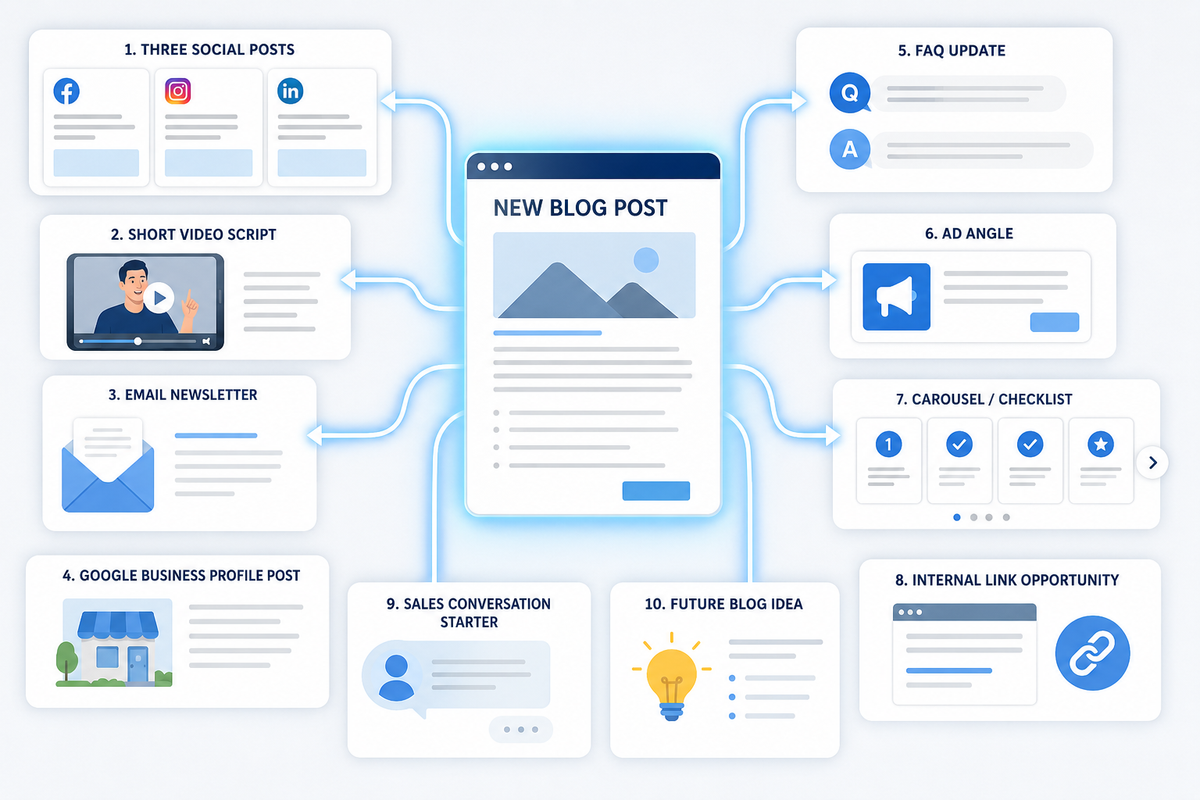
One strong blog can turn into social posts, videos, emails, Google Business Profile updates, ad angles, FAQ content, and more. That means you do not have to reinvent your marketing every week.
You just need a system.
And for small businesses, that system matters because time is limited. You probably do not have a full marketing department waiting around to create 30 fresh ideas every month.
So let’s make one idea work harder.
Why repurposing works so well
Most small business owners think they need more ideas.
Usually, they don’t.
They need to use the ideas they already have in more places.
A blog gives you:
- a main topic
- key points
- examples
- FAQs
- a call-to-action
- keywords
- internal link opportunities
That is already the raw material for multiple pieces of content.
The trick is not copying and pasting the whole blog everywhere. The trick is reshaping it for each platform.
The big rule: one idea, many formats
A blog is long-form content. Social posts are quick. Videos need hooks. Emails need a personal angle. Google Business Profile posts need to be short and local. Ads need a clear offer.
Same idea. Different packaging.
Think of it like this:
The blog is the full meal. Every other content piece is a snack-sized version.
That’s how you stay consistent without burning out.
The 10-piece repurposing breakdown
Let’s say your blog topic is:
“Why Your Leads Are Low Quality: 7 Filters That Fix It Fast.”
Here’s how that one blog becomes 10 marketing pieces.
Piece #1: Three social posts
Pull three useful points from the blog and turn each into a short post.
Example posts:
- “Getting leads from outside your service area? Add a ZIP code field to your form.”
- “Cheap leads are not always good leads. Track qualified leads, not just form fills.”
- “If job seekers keep clicking your ads, add negatives like jobs, hiring, salary, and career.”
These can go on Facebook, LinkedIn, Threads, Bluesky, or Google Business Profile with small tweaks.
Piece #2: One short video script
Turn the blog into a 30-second talking-head or screen-recording video.
Example script:
“Getting leads but most of them are junk? Before you raise your ad budget, check your filters. Start with your service area, your keywords, your form fields, and your call handling. One small change, like adding a ZIP code field or negative keywords, can save you from wasting time on leads that were never a fit.”
That’s one video from one section of the blog.
Piece #3: One email newsletter
Your blog can become a short email to your list.
Email structure:
- quick problem
- one useful tip
- link to the full blog
- soft CTA
Example:
“Are your leads starting to feel like spam, tire kickers, or wrong-area inquiries? Before blaming the platform, check your filters. We put together a simple breakdown of seven filters that can improve lead quality fast.”
Now your blog drives email engagement.
Piece #4: One Google Business Profile post
GBP posts should be short, local, and action-oriented.
Example:
“Getting leads that are outside your service area or not a fit? Small fixes like clearer service areas, better forms, and stronger calls-to-action can improve lead quality. Read our latest small business marketing tip to learn where leads usually leak.”
This keeps your profile active and connects content back to local visibility.
Piece #5: One FAQ update
If the blog answers a common question, add that answer to your website FAQ.
Example FAQ:
Why am I getting low-quality leads from my website?
Low-quality leads often come from loose targeting, vague offers, unclear service areas, weak form fields, or spam submissions. Start by checking your service area, adding a ZIP code field, reviewing ad search terms, and tracking qualified leads separately from junk leads.
That FAQ can help future visitors and support SEO.
Piece #6: One ad angle
Blogs are great for finding ad hooks.
Example ad angle:
Tired of paying for junk leads?
Before you spend more on ads, fix the filters that decide who gets through.
This could become:
- a retargeting ad
- a lead magnet ad
- a service-page CTA
- a short video ad
The blog gives you the thinking. The ad turns it into a direct message.
Piece #7: One carousel or checklist
A list-style blog can become a carousel.
For the lead quality blog, the carousel might be:
Slide 1: “Getting junk leads?”
Slide 2: “Filter by service area”
Slide 3: “Tighten keywords”
Slide 4: “Clean up forms”
Slide 5: “Track qualified leads”
Slide 6: “Stop paying for junk”
This works well for Instagram, LinkedIn, Facebook, and Pinterest.
Piece #8: One internal link opportunity
Every blog should connect to another relevant page on your website.
Example:
If the blog is about lead quality, link to:
- your SEO service page
- your Google Ads service page
- your landing page optimization blog
- your call tracking blog
- your contact form UX blog
Internal links help readers move through your site. They also help search engines understand how your content is connected.
Piece #9: One sales conversation starter
Blogs can help your sales process too.
If a lead says, “We’re getting lots of leads but they’re not good,” you can send them the blog and say:
“This might help explain what’s happening. Usually the issue is not just traffic volume, it’s the filtering system.”
That makes you helpful before you sell.
Piece #10: One future blog idea
Every blog should create another blog.
From the lead quality topic, follow-up blogs could be:
- “How to Build a Better Contact Form”
- “What Is a Qualified Lead?”
- “How to Stop Spam Form Fills”
- “Should I Use Call Tracking?”
- “Why Cheap Leads Cost More Than You Think”
That keeps your content pipeline full.
A simple weekly repurposing workflow
Here’s a realistic workflow for a tiny team.
Monday: Publish the blog
Post the full blog on your website.
Tuesday: Pull three social posts
Take the best three points and schedule them.
Wednesday: Record one short video
Use one paragraph from the blog as your script.
Thursday: Send a short email
Share the problem, one tip, and the blog link.
Friday: Update GBP or FAQ
Add either:
- one Google Business Profile post, or
- one FAQ to a relevant service page
That’s one blog turned into a full week of marketing.
How to track repurposed content
If you’re sharing links across platforms, use UTM tracking.
For example:
- Facebook post link
- email newsletter link
- GBP post link
- QR code link
- ad link
Each one should be labeled so you know where traffic came from.
That way, repurposing is not just “more content.” It becomes measurable marketing.
The biggest repurposing mistake
The biggest mistake is copying the same exact post everywhere.
Don’t do that.
Instead:
- Facebook can be conversational
- LinkedIn can be educational
- Instagram can be visual
- email can be personal
- GBP should be short and local
- ads should be offer-focused
Same idea, different format.
The bottom line
You do not need to create from scratch every day.
You need a system that turns one good idea into many useful pieces.
Start with one blog. Pull out the best points. Turn them into social posts, videos, emails, GBP posts, FAQs, ads, and internal links.
That is how small businesses stay visible without burning out.
Need help turning your blogs into a repeatable content system that supports small business SEO? Managed Nerds offers practical SEO and marketing support to help you plan content, repurpose it across platforms, improve website visibility, and connect your marketing efforts back to real leads.
Thank you for reading. If you’d like more small business SEO tips, subscribe for updates.