Why Isn’t My Google Business Profile Showing Up for “Near Me” Searches?
Customers search “near me” and you’re nowhere, even though you’re close. Here’s why Google skips your Business Profile, and the fixes that actually move the needle.

You’re close. You’re open. You have reviews. You search your own service on Google Maps and… nothing.
Meanwhile a competitor shows up two blocks away with fewer reviews and a website that looks like it was built in 2011.
If you’ve ever said, “I’m literally near them, why am I missing?” welcome to the world of “near me” results.
“Near me” does not mean “best.” It means “closest match Google trusts right now.”
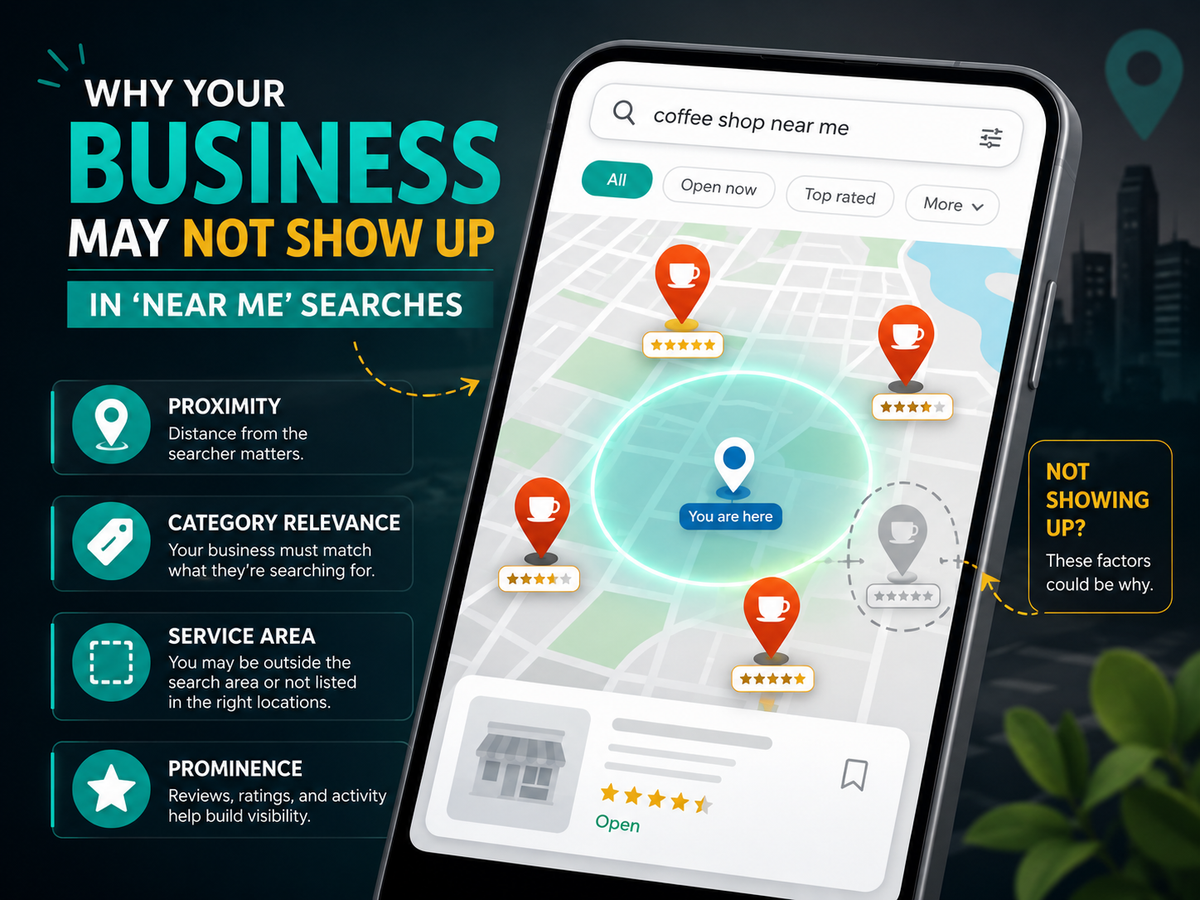
Google Maps results are heavily influenced by:
- Proximity (how close you are to the searcher)
- Relevance (how well your profile matches the search)
- Prominence (how established and trustworthy you look online)
You can’t control where the searcher is standing. But you can absolutely control the signals that decide whether Google includes you when the map pack is tight.
Reason 1: Proximity is doing what proximity does
This is the part nobody likes.
If someone searches “roof repair near me” from their living room, Google often prioritizes businesses close to that living room. Two miles can change everything, especially in competitive categories.
What you can do about it:
- Focus on relevance and prominence so you win when distance is close.
- Strengthen your presence in your most profitable zones (service pages, reviews, photos, citations).
- Stop expecting one profile to dominate every neighborhood equally.
“Near me” is a moving target.
Reason 2: Your primary category is slightly wrong
This is one of the biggest silent killers.
If your primary category is too broad or not the closest match to what customers type, Google has less confidence showing you.
Example problems:
- You picked a category that sounds “professional,” but customers search something more specific.
- You’re using a “catch-all” category when your competitor is using the exact match.
Quick fix:
- Make sure your primary category matches your #1 money-making service.
- Use a few supporting categories, but don’t go category-crazy.
If you’re competing in the wrong lane, you’ll never win “near me.”
Reason 3: Your services list is thin, vague, or missing key terms
Categories tell Google what you are. Services tell Google what you do.
If your services section is empty, generic, or doesn’t reflect real searches, you’re leaving relevance on the table.
Fix it:
- Add services that match customer language:
- “emergency roof repair”
- “buyer home inspection”
- “commercial pressure washing”
- “radon testing”
- “sprinkler repair”
- Avoid marketing fluff. Use plain words customers type.
If Google can’t match your profile to the exact search, it chooses someone else.
Reason 4: Your service area settings are working against you
If you’re a service-area business (trades, inspectors, mobile pros), your setup matters.
Common mistakes:
- Service area is wildly too large
- Service area is missing your real core towns
- Your address settings don’t match your real business model
- You’re trying to “hack” visibility with questionable address practices
Fix it:
- Keep service areas realistic and accurate.
- Make sure your listed areas match where you actually want leads.
- Don’t play games that risk a suspension. Suspended profiles don’t rank at all.
Reason 5: Your profile is “complete,” but not competitive
A lot of businesses stop at “filled out.”
But “filled out” and “competitive” are not the same.
A competitive profile usually has:
- consistent review velocity (not a burst once a year)
- fresh photos
- a strong description and services list
- review replies that sound human
- accurate hours and details
- signs of activity (posts, updates, Q&A)
A profile can be technically correct and still lose because it looks inactive.
Reason 6: Your business info is inconsistent across the web
Google builds confidence when it sees consistent info across trusted sources.
If your business name, phone, address/service area, or URL differs across directories, you create uncertainty. Uncertainty can reduce visibility.
Fix it:
- Make sure your “official” info matches everywhere it matters:
- website
- Google Business Profile
- Facebook/LinkedIn
- major directories
- Remove duplicates and old listings where possible.
This isn’t exciting work, but it’s one of the highest ROI “near me” fixes.
Reason 7: Your competitor has stronger prominence signals than you realize
Prominence isn’t just reviews. It can include:
- links and mentions from local sites
- directory/citation strength
- brand searches (people searching their name)
- strong service pages on their website
- consistent posting and engagement
Sometimes the competitor is simply better established online, even if they’re not better at the service.
That’s annoying. It’s also fixable.
The “Near Me” Fix Checklist
If you want a practical action plan, start here:
- Tighten your primary category
- Expand services with real search phrases
- Verify service area settings
- Add fresh photos regularly (real work, team, equipment, results)
- Ask for reviews consistently (and reply to them)
- Clean up NAP consistency (name, address/service area, phone)
- Strengthen your website with service pages + local proof
- Build a few local mentions/links (partners, chambers, sponsors, associations)
Do these and you’ll stop disappearing as often.
Final Thought
If your profile isn’t showing up for “near me,” it’s usually not a mystery or an algorithm curse.
It’s one of these:
- distance
- relevance signals (categories/services)
- service area configuration
- prominence and trust signals
- inconsistent info across the web
If you want help fixing this without guessing, Managed Nerds can audit your Google Business Profile, clean up the local signals that matter, and build a simple plan to increase visibility where you actually want customers.
Need help with small business SEO? We’ll help you show up, get clicks, and turn Maps visibility into real calls.