Why Your Google Ads Show a Globe Icon Instead of Your Logo
If your Google Ads show a grey globe where a logo should be, you look less established than the competitor above you. Learn how to fix it.

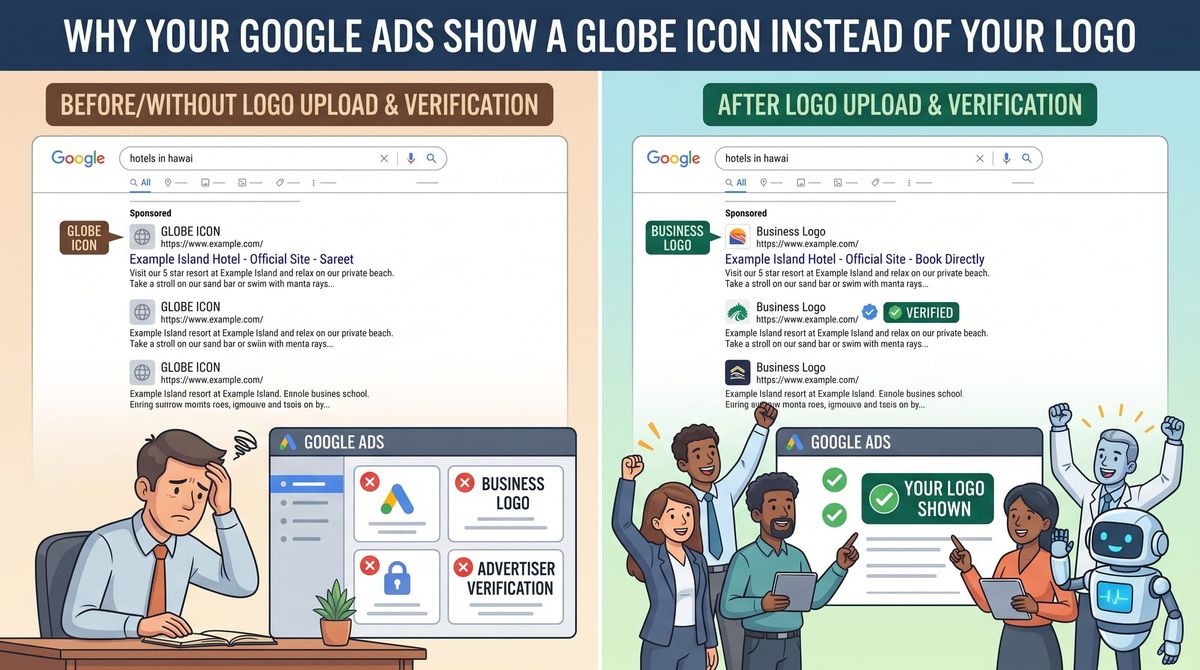
Search for what you sell and look at the ads above the map.
Some of them show a business name and a small round logo. Others show a grey globe icon and a web address. Same ad position, same budget bracket — one looks like an established company and one looks like a link.
That difference is a setting, plus a verification process, and most small advertisers have never done either.
What the feature is
Google lets advertisers attach business information assets — a business name and a business logo — to their text ads. When they serve, your name and a small circular logo appear with the ad instead of the default placeholder globe and display URL.
It costs nothing. It's not a bid. It's brand recognition in the one place where you're sitting directly next to competitors, and it's the cheapest credibility available in a Google Ads account.
Why yours might not be showing
Three reasons, in order of how common they are.
1. You never set it up. The assets have to be added to your account. Nobody does this by default.
2. You haven't completed advertiser verification. Google's verification program confirms you're a real business. Business information assets are tied to it, so without verification you're not eligible.
3. Google chose not to serve them. This is the one that surprises people. Even with verification completed, these assets aren't guaranteed to serve. Google reviews eligibility on its own and may show the placeholder globe instead, and there's no setting to override that. Eligibility gets re-reviewed automatically over time, so it's worth checking back periodically rather than assuming it's permanently broken.
So the honest framing is: set it up correctly, and you're eligible — not guaranteed.
Getting it right
Verify your business. Advertiser verification is a requirement for a growing list of Google Ads features, not just this one. If you haven't done it, it belongs on your list regardless. It asks for documentation confirming your business identity, so set aside time rather than starting it between calls.
Match your name to reality. Your business name has to match the business you're advertising and be consistent with your domain or your verified legal name. A clever marketing phrase in the business name field is a rejection.
Get the logo specs right. The logo should be square, and Google renders it in a circle at a small size. Two consequences: anything important near the corners gets cropped, and anything detailed becomes unreadable. A wordmark that looks great on your van will turn into grey mush at that size.
If your logo is a horizontal wordmark — which most small business logos are — you need a square version. Usually that means the icon or monogram on its own, or your initials set cleanly on your brand color.
Own what you upload. You're confirming you have the legal right to the name and logo you publish, and the assets have to comply with Google's trademark and copyright policies. Don't upload a logo a designer made for you unless you're clear that you own it.
Check your landing page matches. Your business name should be identifiable on the page the ad points to. Consistency between ad and destination is a recurring theme in Google's requirements.
While you're in there
Three other free-to-add things most small accounts are missing:
- Sitelinks to your key service pages.
- Location and call assets, if you want calls and visits.
- Structured snippets listing the services you actually offer.
None of these cost anything. All of them make your ad physically larger on the page, which pushes competitors further down.
Bottom line
You're paying the same amount per click as the business above you. Whether your ad looks like a real company or a stray URL is free, and it's a setup task you do once.
Set up advertiser verification, add your business name and a square logo, then check back in a few weeks to see whether they're serving.
Not sure whether your account has any of this configured? Our small business SEO and marketing services include a full account review — assets, verification, tracking, and what your ads actually look like to a customer. Reach out and we'll check.