Check Your Browser Extensions: They May Have More Access Than You Realize
Browser extensions can have access to websites, browsing history, tabs, and other sensitive information. Learn how small businesses can audit Chrome and Edge extensions and reduce unnecessary access.

Browser extensions are convenient.
They block ads.
Fix grammar.
Manage passwords.
Take screenshots.
Help with AI.
Track tasks.
Save time.
And that convenience is exactly why most people install them without thinking much about what they’re actually allowed to do.
For small businesses, that can be a problem.
A browser extension can potentially have access to some of the most sensitive parts of your workday — including the websites you visit, the tabs you open, the information you copy and paste, and in some cases, the actual content of webpages you use for banking, email, CRM systems, cloud storage, or customer accounts.
Google itself warns that certain extension permissions can allow an extension to read, request, or modify data on every webpage you visit, including sensitive sites like bank accounts or social media. Some permissions can also expose browsing history, tab activity, location, and clipboard data.
That doesn’t mean every browser extension is dangerous.
It does mean every business should know what its extensions are allowed to do.
Why Browser Extensions Matter More in 2026
The browser has become one of the most important workspaces in modern business.
Small businesses now use browsers to access:
- Microsoft 365
- Google Workspace
- Accounting software
- Banking portals
- CRMs
- Scheduling tools
- Cloud storage
- AI platforms
- Customer dashboards
That means the browser is no longer just a place to “browse.”
It’s where a huge amount of business activity happens.
And extensions sit directly inside that environment.
Recent LayerX research highlights just how common that exposure is. Its 2026 Enterprise Browser Extension Security Report says 99% of enterprise users have at least one extension installed, while about 25% have more than 10. The same report says roughly 15% of users have an AI-enabled extension installed.
For a small business, that could mean every employee has multiple extensions operating inside the same browser they use for customer information and company accounts.
What Does “Read and Change Your Data” Actually Mean?
This is where people often click “Allow” without really knowing what they’re approving.
Chrome lets extensions request different levels of access.
An extension may be able to:
- Read your browsing history
- See the URLs and titles of websites you visit
- Read or modify webpage data
- Access copied-and-pasted information
- Access data on specific websites
- Access data on all websites
Google explicitly explains that an extension with access to “all sites” can automatically read and change data on every site you visit.
Think about what that could include for a small business:
Your email inbox.
Your customer portal.
Your online bank.
Your CRM.
Your accounting dashboard.
Your cloud files.
That’s why permissions matter.
A High Permission Level Doesn’t Automatically Mean Malicious
This is important.
Some extensions genuinely need broad access to function.
A password manager may need to detect login forms.
A grammar checker may need to read text fields.
An accessibility extension may need to interact with web pages.
So the question isn’t:
“Does this extension have permissions?”
The question is:
“Do those permissions make sense for what this extension is supposed to do?”
If a simple calculator extension wants access to every website you visit, that deserves a closer look.
Recent Research Shows Permissions Are Often Very Broad
LayerX’s 2025 Browser Security Report found that more than half of extensions installed by enterprise users had “high” or “critical” permission levels. The same report found that 54% of extension publishers used free Gmail accounts and 26% of extensions observed in its dataset were sideloaded rather than installed through standard extension stores.
Those statistics come from LayerX’s enterprise customer data, so they shouldn’t be treated as universal numbers for every browser user.
But they do show how much trust businesses routinely place in browser extensions.
AI Extensions Deserve Extra Attention
AI extensions are becoming especially popular.
They can summarize pages, write emails, generate content, analyze documents, and assist with research.
But they may also require significant access.
LayerX’s 2026 report found AI extensions were 60% more likely to have a known CVE, three times more likely to have access to cookies, and 2.5 times more likely to be able to execute remote scripts than non-AI extensions in its dataset.
That doesn’t mean AI extensions are inherently bad.
It means businesses should be more deliberate about which ones employees install.
Extensions Can Change Over Time
Another risk is that extensions are not static.
They get updated.
Developers change.
Companies get acquired.
Permissions expand.
LayerX reports that 34% of extensions increased their permissions over the previous 12 months, with AI extensions significantly more likely to do so.
So even if an extension looked fine when you installed it six months ago, it may not have exactly the same access today.
That’s another reason periodic audits matter.
What Could This Mean for a Small Business?
Imagine an employee installs a free productivity extension.
Months later, that extension gets sold to another company.
An update increases its permissions.
Now the extension has broad access to webpages used for:
- Customer communication
- Billing
- Vendor accounts
- Cloud documents
The employee may not notice any change.
The extension still looks the same.
That’s why browser extensions should be treated more like software than browser decorations.
The Five-Minute Browser Extension Audit
Here’s something every small business can do today.
In Chrome
Open:
Chrome → Extensions → Manage Extensions
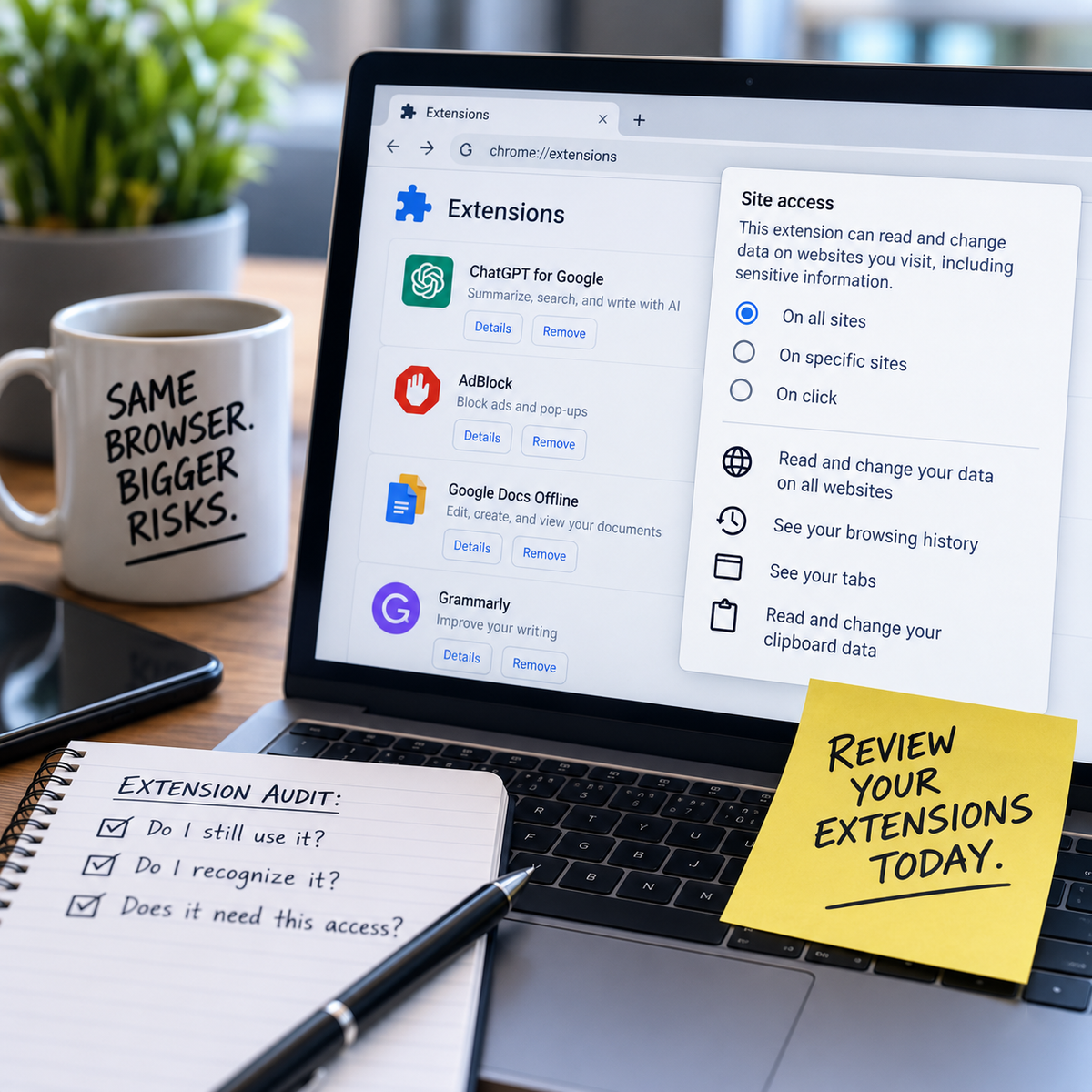
Google allows users to review an extension’s details and change its site access.
You may see options like:
- On click
- On specific sites
- On all sites
Where possible, choose the least access the extension actually needs.
Ask These Three Questions
For every extension:
1. Do I still use this?
If not, remove it.
2. Do I recognize who made it?
If you have no idea where it came from, investigate before keeping it.
3. Does it really need this much access?
If an extension has access to every webpage but only needs to work on one site, reduce its permissions.
That audit may take five minutes.
And it can dramatically reduce unnecessary browser access.
Microsoft Edge Users Should Check Too
This isn’t only a Chrome issue.
Microsoft Edge also gives administrators controls to manage extension permissions, block extensions requiring certain permissions, control which sites they can access, and enforce minimum extension versions.
Microsoft also recommends least-privilege principles for extension developers, meaning extensions should request only the permissions necessary to perform their intended function.
The same logic applies to businesses:
Give extensions only the access they actually need.
Employees Need to Understand This Too
A common small-business security problem is that employees install extensions without realizing they’re adding software to a business environment.
They may think:
“It’s just a browser add-on.”
But that “add-on” may have access to sensitive data.
Employees should know:
- Don’t install extensions casually.
- Avoid unnecessary extensions.
- Review permissions before clicking Allow.
- Remove extensions you no longer use.
- Ask IT before installing tools with broad access.
Training employees to pause before installing software can prevent a lot of unnecessary risk.
Business Owners Can Set Better Rules
If you have a few employees, you don’t need a complicated enterprise policy.
A simple rule may be enough:
Business browsers should only contain extensions employees actually need for work.
You can also maintain a short approved list.
For example:
- Password manager
- Approved security tool
- Approved productivity tools
- Approved AI tools
Everything else gets reviewed before installation.
Simple rules are easier to follow.
How Managed Nerds Can Help
Browser security is easy to overlook because everything looks normal until something goes wrong.
Managed Nerds helps small businesses review the technology employees use every day, including browsers, extensions, Microsoft 365, Google Workspace, devices, and cybersecurity settings.
That can include:
- Managed IT services
- Cybersecurity awareness training
- Browser and device security reviews
- Account and identity protection
- Software and extension guidance
- Microsoft and Google Workspace support
- AI training and consulting
The goal isn’t to block useful tools.
It’s to make sure useful tools aren’t receiving more access than they actually need.
The Tech Tip: Audit Your Extensions Today
Open your browser extensions right now.
You’ll probably find at least one you forgot you installed.
Maybe two.
If you don’t use it, remove it.
If you don’t recognize it, investigate it.
If it has access to every website and doesn’t need it, restrict it.
Browser extensions can be incredibly useful.
But the more access they have, the more important it is to know exactly what’s running inside your browser.
Need Help Reviewing Your Business Technology?
If you’re not sure what software, extensions, or cloud tools your employees are using—or what those tools can access—Managed Nerds can help you review your environment and improve your security without overcomplicating things.
From managed IT and cybersecurity training to Microsoft 365, Google Workspace, and AI consulting, Managed Nerds helps small businesses use modern technology more safely and intentionally.
Want More Small Business Tech Tips?
Subscribe for straightforward tips about cybersecurity, AI, productivity, and business technology. We’ll help you understand what’s changing, why it matters, and what practical steps your business can take next.