How Do I Use AI to Bring Back Past Customers Without Sounding Desperate?
The easiest sale is usually a past customer, but most small businesses never follow up. Here’s how to use AI to write reactivation messages that feel helpful, not needy.

Most small businesses have a lead problem that isn’t really a lead problem.
It’s a follow-up problem.
You’ve already done the hard part:
- someone trusted you once
- they paid you once
- you delivered once
And then… silence.
Not because they hate you. Because life happens. People forget. They move on. They assume you’re busy.
Here’s the tabloid truth:
Your past customers are the easiest sales you’re ignoring.
AI can help you run a simple reactivation campaign that feels helpful, not needy, without you spending hours writing messages.
Why “reactivation” works so well for small businesses
Past customers convert better because trust is already built.
They don’t need a 2-page explanation of who you are. They already know:
- you’re real
- you showed up
- you solved a problem
So your job is not to “sell.”
Your job is to re-enter their world at the right moment with a clean message.
The biggest mistake: the “Hey just checking in” message
Most reactivation attempts fail because they’re vague.
- “Hey, just checking in”
- “We’d love to work with you again”
- “Let us know if you need anything”
That puts the work on the customer. And customers don’t want homework.
Reactivation works when you give them:
- a reason
- a reminder
- a simple next step
AI is great at producing those, consistently.
Step 1: Pick one reactivation trigger
You don’t need a complicated campaign. Pick one trigger that fits your business.
Good triggers:
- Seasonal: “Spring maintenance,” “hurricane season prep,” “year-end review”
- Time-based: “It’s been 6 months since…”
- Service-cycle: “It’s time for a checkup/refresh”
- Value-based: “We added a faster option / new service”
Pick one. Keep it repeatable.
Step 2: Choose your audience (don’t blast everyone)
A small business reactivation list should be simple:
Group A: Best customers
People who paid on time and were easy to work with.
Group B: “Normal” customers
Good experiences, average ticket.
Group C: Past quotes that never closed
Not customers yet, but warm leads.
Start with Group A. Always.
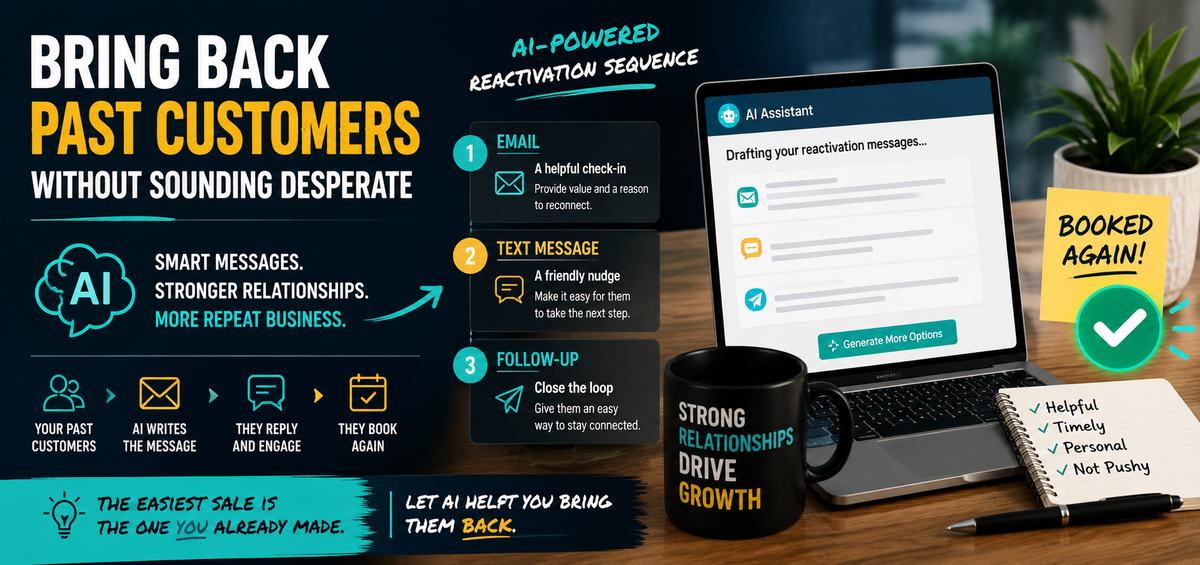
Step 3: Use the 3-message reactivation sequence
This is the sweet spot. It’s not spammy, but it’s consistent.
Message 1: The helpful check-in
Goal: remind them who you are and offer something useful.
Message 2: The nudge with options
Goal: make the next step easy with two choices.
Message 3: The close-the-loop
Goal: give them an easy out while staying professional.
AI prompt to build your campaign in your voice
Copy/paste this and fill in brackets:
AI Prompt: Reactivation Campaign Builder
“Write a 3-message reactivation campaign for past customers of a small [industry] business.
Tone: friendly, confident, local, not pushy.
Goal: get replies and bookings.
Include:
- Message 1 (email)
- Message 2 (text)
- Message 3 (email or text)
Constraints: no guilt language, no hype, no emojis, no filler phrases.
Include a clear next step and one simple question in each message.
Here’s our service and offer: [what you do + the trigger].”
Now here are ready-to-use templates.
Template: Message 1 (Email)
Subject: Quick check-in from [Business Name]
Hi [Name],
Just a quick check-in, we helped you with [service] at [timeframe]. If everything’s been going smoothly, great.
If you want to stay ahead of issues, we’re scheduling [seasonal/checkup/refresh] appointments in the next [time window].
Would you like to grab a spot, or should I send you two time options?
Thanks,
[Your Name]
Template: Message 2 (Text)
Hey [Name], it’s [Your Name] with [Business]. Quick heads-up: we’re booking [service/seasonal check] this week. Want me to hold a spot for you, or should I send two time options?
Template: Message 3 (Close-the-loop)
No worries if timing isn’t right. Want me to close this out for now, or keep you on the list for the next [season/quarter] check-in?
Step 4: Add one “value hook” so it doesn’t feel like marketing
Reactivation messages work best when you include a small value hook, like:
- “Here’s a quick checklist”
- “Here’s what we’re seeing this season”
- “Here’s a common issue to watch for”
- “Here’s a 2-minute tip that saves money”
AI Prompt: Value hook
“Write a 5-bullet quick tip checklist related to [service] that a past customer would find useful. Keep it practical and non-salesy.”
Add that checklist to Message 1 and you’ll get more replies.
Step 5: Track it with a simple system (no fancy CRM required)
Use a spreadsheet or notes tracker with:
- Name
- Last service date
- Segment (A/B/C)
- Message 1 sent (date)
- Message 2 sent (date)
- Result (booked / replied / no response)
This keeps you consistent without turning you into a marketing department.
The “Don’t Reactivate These People” rule
This part matters more than people admit.
Don’t re-engage customers who:
- didn’t pay
- argued constantly
- created scope creep chaos
- treated your team poorly
Reactivation is a growth tool. Don’t use it to invite headaches back.
What this looks like in real businesses
- Trades: seasonal inspections, maintenance checks, “storm season prep,” “annual refresh”
- Insurance agencies: annual policy review reminder, coverage check-in
- Realtors: “home anniversary” check-in, vendor network offer
- Consultants: quarterly check-in, new service announcement
- IT/tech: “security checkup,” device refresh, training refresher
The message structure stays the same. The hook changes.
Wrap-up
You don’t need more leads if you’re sitting on a list of people who already trust you.
AI helps you run a simple reactivation system:
- pick a trigger
- segment your list
- run a 3-message sequence
- add a small value hook
- track results
If you want help setting this up (templates, prompts, tracking, and a simple workflow your team can follow), Managed Nerds can build a practical AI-driven reactivation system that fits small businesses without turning you into a full-time marketer.