That QR Code Could Be a Trap: What Small Businesses Need to Know About Quishing
QR codes are convenient, but scammers use them too. Learn how QR code phishing works, why small businesses are targets, and how employees can recognize suspicious codes.

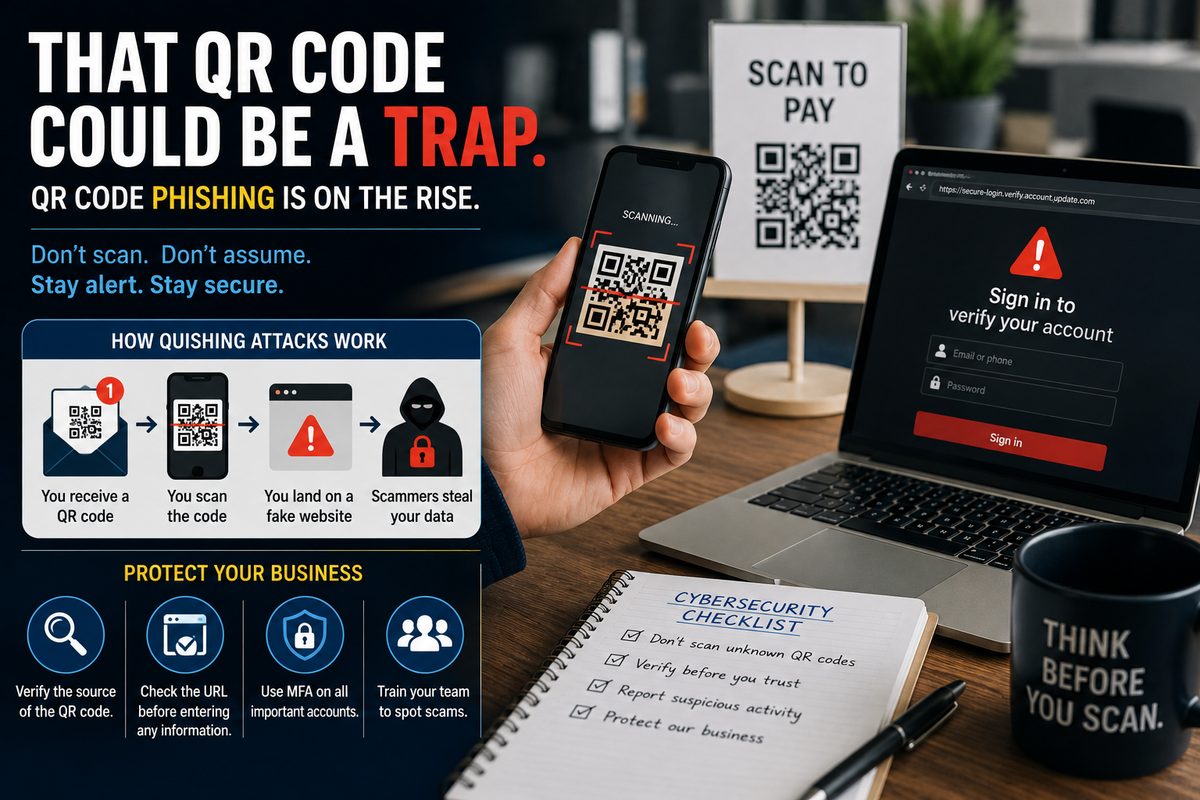
QR codes have made life easier.
Scan one at a restaurant and there's the menu. Scan another to pay an invoice, download an app, visit a website, connect to Wi-Fi, or pull up someone's contact information.
For small businesses, they're inexpensive, convenient, and easy for customers and employees to use.
Unfortunately, scammers know that too.
Cybercriminals can use malicious QR codes to send people to fake websites designed to steal passwords, payment information, or other sensitive data. The technique has become known as QR-code phishing, or "quishing."
And there's one big reason it works:
Most of us scan first and ask questions later.
What Is Quishing?
Traditional phishing usually tries to convince you to click a malicious link.
Quishing changes the delivery method.
Instead of giving you a clickable link, the attacker gives you a QR code.
Scan the code and your phone opens whatever destination has been programmed into it.
That destination might be a legitimate website.
Or it might be a convincing copy of your Microsoft 365 login page.
Your bank.
A payment portal.
Google.
A delivery service.
Or another website you already trust.
The QR code itself doesn't tell you which one you're getting.
Why Would Criminals Use QR Codes Instead of Normal Links?
One advantage for attackers is that QR codes can make the destination less obvious.
Consider an email containing this:
https://definitely-not-your-bank.example
You might immediately become suspicious.
Now imagine the same destination hidden behind a QR code accompanied by:
"Scan to verify your account."
Suddenly, there's much less information available before you interact with it.
QR codes can also move an attack from a protected business computer onto an employee's smartphone.
An employee receives a suspicious email on their work computer, scans the QR code with their personal phone, and continues from there.
That's exactly the kind of behavior businesses need to discuss during cybersecurity training.
What Could This Look Like at a Small Business?
Imagine an employee receives an email that appears to come from Microsoft.
It says:
"Your Microsoft 365 password expires today. Scan the QR code below to keep your account active."
The employee recognizes Microsoft 365 because they use it every day.
They scan the code.
A Microsoft-looking login page appears.
They enter their email address and password.
The page says something went wrong.
The employee closes it and goes back to work.
But the login information may have just been sent to a criminal.
The employee didn't download malware.
They didn't intentionally visit a suspicious website.
They simply scanned a QR code they thought they could trust.
QR-Code Scams Aren't Limited to Email
This is what makes the threat particularly interesting for small businesses.
QR codes exist in the physical world too.
Businesses use them on:
- Signs
- Menus
- Business cards
- Flyers
- Invoices
- Product packaging
- Event materials
- Payment displays
- Marketing materials
Imagine a business accepting payments through a QR code displayed near the register.
Someone places a sticker containing another QR code directly over it.
Customers scan the replacement and unknowingly visit the scammer's payment page instead.
Now your customers could associate that scam with your business, even though you didn't create it.
That makes QR-code security an employee issue, an owner issue, and potentially a customer-service issue.
"But My Phone Warns Me About Dangerous Websites, Right?"
Sometimes.
Modern phones, browsers, email security systems, and security products can identify many malicious websites.
But security technology isn't perfect.
Attackers constantly create new domains, redirect visitors through multiple websites, and build convincing copies of legitimate login pages.
A security warning is helpful when you get one.
You shouldn't assume the absence of a warning means a QR code is trustworthy.
Slow Down Before You Scan
You don't need to stop using QR codes.
You simply need to treat them like links.
Before scanning, ask:
Where did this code come from?
If an unexpected email tells you to scan a QR code immediately, that's worth questioning.
Does the request make sense?
Would your bank normally ask you to verify your account this way?
Is there another way to get there?
Instead of scanning a QR code to access Microsoft 365, open Microsoft 365 using your normal bookmark or app.
Does the destination look correct?
Many phones display or preview the destination before opening it. Take a second to look at it.
That extra moment could prevent an account compromise.
Watch for Urgency
Phishing attacks frequently try to rush people.
You may see messages like:
Your password expires today.
Payment required immediately.
Your account will be suspended.
Scan within 24 hours.
Your invoice is overdue.
The goal is to make you react before you think.
A QR code doesn't change that strategy. It simply gives scammers another way to deliver it.
Employees Need to Know Phishing Has Changed
Cybersecurity awareness training can't stop at:
"Don't click suspicious email links."
Today's employees also need to recognize malicious QR codes, fake login pages, AI-generated phishing messages, impersonation attempts, voice-cloning scams, malicious attachments, and other forms of social engineering.
Employees should know that scanning a QR code is effectively the same as clicking a link.
If they wouldn't click a suspicious link in an email, they shouldn't automatically scan a QR code from that same email.
Business Owners Should Protect Their Own QR Codes Too
If your company publicly displays QR codes, periodically inspect them.
This is particularly important for codes connected to:
- Payments
- Customer portals
- Online ordering
- Reviews
- Wi-Fi access
- Account logins
Make sure someone hasn't covered or replaced the original code.
For printed materials, test your own QR codes periodically and confirm that they still lead exactly where they're supposed to.
You should also consider placing the actual website address near important QR codes so customers have another way to verify where they're going.
MFA Can Still Help
If an employee accidentally gives away a password, multi-factor authentication (MFA) can provide another layer of protection.
It isn't an excuse to ignore phishing, and some sophisticated phishing techniques can attempt to defeat certain forms of MFA.
But businesses should still enable strong MFA wherever possible.
Security works best in layers.
Employee training helps prevent the mistake.
MFA helps protect the account.
Security monitoring can help identify suspicious activity.
Good policies help employees know what to do next.
No single layer has to do everything.
What If an Employee Already Scanned One?
Scanning a QR code doesn't automatically mean the device or account has been compromised.
What happened afterward matters.
If an employee scanned a suspicious QR code and then entered a password, payment information, customer information, or other sensitive data, they should report it immediately.
Don't wait to see if something happens.
Depending on the situation, the business may need to change credentials, terminate active sessions, review account activity, inspect the device, contact a financial institution, or take additional security measures.
The faster the issue is reported, the more options you may have.
How Managed Nerds Can Help
Small businesses don't need enterprise-sized cybersecurity departments to develop better security habits.
They do need employees who understand what modern attacks actually look like.
Managed Nerds helps small businesses strengthen their defenses through cybersecurity awareness training, managed IT services, account security, multi-factor authentication, technology consulting, and practical cybersecurity guidance.
Training can be especially valuable because phishing isn't standing still.
Employees who learned to avoid suspicious email attachments years ago now need to recognize QR-code phishing, AI-powered impersonation, fake cloud login pages, and other modern social engineering techniques.
The objective isn't to make employees afraid to use technology.
It's to give them enough knowledge to recognize when something doesn't look right and know what to do next.
The Tech Tip: Treat Every QR Code Like a Link
QR codes aren't inherently dangerous.
They're simply another way to reach something on the internet.
And that's exactly how you should treat them.
Before you scan, consider who provided the code, where it's supposed to take you, and whether you can access the same service through a trusted app or website instead.
For small businesses, one simple habit can go a long way:
Scan. Check. Then continue.
And if an unexpected message is demanding that you scan something immediately?
That's probably the perfect time to slow down.
Need Help Preparing Your Employees for Modern Cyber Threats?
Phishing has evolved far beyond suspicious emails. Managed Nerds can help your business build stronger security habits through cybersecurity awareness training, managed IT support, MFA implementation, account protection, and practical technology guidance designed for small businesses.
You don't need employees to become cybersecurity experts.
You need them to know when something looks suspicious and what to do before a simple scan becomes a much bigger problem.
Want More Small Business Tech Tips?
Subscribe for straightforward tips about cybersecurity, AI, productivity, and business technology. We'll help you understand what's changing, why it matters to your business, and the practical steps you can take to stay ahead.